The best security awareness platform for onboarding speed is the one that gets your own staff enrolled, learning and visible in reports with the least administrator work. For your 2026 shortlist, evaluate Cyber Aware, KnowBe4 and Proofpoint against the same pilot; treat the order below as an evaluation sequence, not a measured speed ranking.
TL;DR
- Judge security awareness platform onboarding speed from approved setup to verified learner completion, not account creation.
- Evaluate Cyber Aware alongside KnowBe4 and Proofpoint using identical enrolment, learner access and reporting tasks.
- Choose the platform that handles new starters and reporting without repeated administrator intervention.
- Separate administrator effort from approval delays when comparing security awareness training and phishing simulation onboarding.
Why this matters
A security awareness platform can look quick to deploy when the demonstration starts with an existing employee list and a configured account. Your rollout starts earlier. Someone must approve access, prepare employee records, decide who receives training and confirm that completion records reach the right manager.
A fast account setup is not a finished rollout. The useful finish line is an employee completing assigned training and an administrator retrieving an accurate record without manual reconciliation.
For a 2026 purchasing decision, separate three clocks: time waiting for approvals, time spent configuring the platform and time spent resolving learner problems. Otherwise, you risk blaming software for an internal approval queue—or choosing software that saves setup time but creates recurring work.
Use the same definition of “onboarded” across every candidate. Do not compare one vendor's account activation with another vendor's completed employee rollout.
What makes the best platform for fast onboarding?
Assess these six criteria before looking at the shortlist:
- Employee enrolment: Staff enter the correct training group without duplicate records or missing users.
- Learner access: Employees reach their assigned training through your intended sign-in process.
- Assignment readiness: Administrators can select suitable content, set deadlines and check assignments before launch.
- Delivery checks: Invitations and reminders reach the intended recipients through approved channels.
- Reporting readiness: A manager can distinguish assigned, completed, overdue and excluded staff.
- Repeatability: A new starter follows the same process without a separate setup project.
Your fastest option must satisfy all six. A platform that launches quickly but cannot produce the required completion evidence has not met the finish line.
For phishing simulations, add a separate delivery test. Training access and simulated-email delivery are different tasks; combining them into a single setup claim hides the source of delays.
Security awareness onboarding options at a glance
This table assigns each option a distinct evaluation role. The “best for” labels describe what to test, not a verified claim that a vendor is faster than its competitors.
| Evaluation order | Option | Best for | Decisive onboarding test | Key limitation to resolve |
|---|---|---|---|---|
| 1 | Cyber Aware | A focused security awareness platform pilot | Complete enrolment, learner access and reporting with your own staff | Confirm the exact setup dependencies before committing |
| 2 | KnowBe4 | A dedicated-platform comparison | Repeat the same workflow without demonstration shortcuts | Keep optional configuration outside the initial speed test |
| 3 | Proofpoint | A procurement-led evaluation | Track approvals separately from administrator work | Do not treat organisational approval time as product setup time |
| 4 | Your existing learning platform | Reusing an established training workflow | Assign suitable content and retrieve usable completion evidence | General training delivery does not establish phishing simulation capability |
1. Cyber Aware: evaluate a focused security awareness rollout
Best for: Buyers assessing whether a security awareness platform fits a clearly defined initial rollout.
Start the Cyber Aware security awareness platform evaluation with your real employee records and a written definition of success. Ask the vendor to demonstrate the complete route from employee selection to a usable completion report, rather than ending the session once invitations are sent.
Keep the first evaluation narrow. Choose the staff group, training objective and report recipient before setup begins, then record every task that requires help from someone outside the training team.
Cyber Aware onboarding advantages to validate:
- Your administrator can identify and complete the required setup steps.
- Employees can access the assigned training through your intended workflow.
- Completion records match the staff included in the pilot.
Cyber Aware onboarding constraints to test:
- Required permissions must be approved before the rollout can proceed.
- Any manual employee maintenance becomes recurring operational work.
These are acceptance tests, not assumed product capabilities. Record the result of each test during your 2026 evaluation and attach the evidence to the purchasing decision.
Choose Cyber Aware for security awareness onboarding only when your pilot proves the complete learner-to-report workflow. A successful demonstration is useful; a successful workflow in your environment is the buying condition.
Verdict: Hold until the pilot passes; buy when the required workflow is repeatable.
2. KnowBe4: evaluate a dedicated-platform alternative
Best for: Buyers who want a dedicated security awareness candidate to compare against the first pilot.
Evaluate KnowBe4 using the same employee sample, assignment requirements and completion-report questions. Do not change the test because a demonstration follows a different sequence or highlights a different feature.
Separate essential setup from optional programme design. If custom content, additional groups or a broader campaign schedule are not required for your first launch, evaluate them after the basic onboarding workflow passes.
KnowBe4 onboarding advantages to validate:
- The initial assignment can proceed without unnecessary configuration.
- Administrators can check enrolment before notifying employees.
- Another authorised administrator can reproduce the setup.
KnowBe4 onboarding constraints to test:
- Optional configuration can expand the scope of the first rollout.
- A prepared demonstration account does not establish setup effort in your environment.
Ask for the dependency list before starting the clock. That list should distinguish tasks performed by your administrator, tasks requiring IT approval and tasks performed by the vendor.
The important comparison is not which demonstration ends first. It is which candidate reaches the same agreed finish line with fewer unresolved exceptions and less repeat work.
Verdict: Hold until KnowBe4 completes the identical pilot; buy only if the results fit your requirements.
3. Proofpoint: evaluate approval and deployment dependencies
Best for: Buyers whose procurement process requires documented security, access and operational approvals.
Use the Proofpoint evaluation to make approval dependencies visible. Request the implementation sequence, identify the owner of each prerequisite and establish what remains possible while approvals are pending.
This evaluation role does not establish a vendor-specific deployment speed. It gives procurement and IT a way to compare the actual work required before training reaches employees.
Proofpoint onboarding advantages to validate:
- The implementation plan identifies prerequisites before the launch date is set.
- Your team can distinguish vendor tasks from internal responsibilities.
- Required reporting is included in the acceptance test.
Proofpoint onboarding constraints to test:
- Approval queues can obscure the amount of hands-on configuration work.
- An implementation plan is not evidence that learner access and reporting work.
For your 2026 comparison, preserve both measurements: elapsed time and administrator effort. A shorter configuration session does not compensate for an unresolved prerequisite that prevents employees from starting.
Require a named owner for every blocker. If a task has no owner, its completion date is not dependable enough to support your rollout plan.
Verdict: Hold until prerequisites and acceptance tests are complete; buy when deployment ownership is clear.
4. Your existing learning platform: evaluate reuse first
Best for: Organisations that already have a working employee training process and need to determine whether another platform is necessary.
An existing learning platform deserves a place in the comparison when staff already use it. Test whether it can deliver suitable security awareness content, assign it to the right employees and produce the evidence your programme needs.
Do not assume familiarity solves every requirement. Assess simulated phishing, reporting workflows and employee lifecycle management separately rather than treating course delivery as a substitute for the whole programme.
Existing learning platform pros:
- You can evaluate the employee access process already in use.
- Existing training ownership provides a starting point for implementation.
- The pilot exposes whether another employee destination is necessary.
Existing learning platform cons:
- Suitable security awareness content remains a separate requirement.
- Training completion records alone do not establish phishing simulation or incident-reporting capability.
Include content preparation and maintenance in the effort calculation. Reusing a platform is not automatically the simpler option if your team must create and maintain the missing programme components.
Verdict: Buy into reuse only when the existing workflow meets the defined scope; skip it as a complete solution when essential functions remain unresolved.
How to measure onboarding speed fairly
Use a written pilot protocol for every candidate. The following test sizes and time allocations are suggested planning choices, not vendor benchmarks or promised deployment times.
Set the scope
Use a 10-person pilot drawn from the employee types you need to support. Include an administrator, a manager who needs reporting and employees with different access requirements. Do not use invented employee records as your only test.
Reserve a 30-minute handover session in which another authorised administrator follows the setup instructions. The purpose is to expose undocumented steps, not to demand that every platform deploy within that period.
Set a 5-business-day observation window for invitations, access problems and completion records. This is a suggested observation period, not an expected implementation duration.
Track the work
Record each task in a simple log:
| Task | Evidence to retain | What it reveals |
|---|---|---|
| Enrol employees | Expected and actual employee lists | Missing, duplicate or incorrectly grouped users |
| Verify access | Learner access result and support request | Sign-in friction and support dependency |
| Assign training | Assignment settings and recipient check | Whether the launch scope is correct |
| Check completion | Learner record and manager report | Whether evidence survives the full workflow |
| Repeat onboarding | New-starter result and administrator notes | Whether launch-day success is repeatable |
Track administrator minutes separately from waiting time. Also record rework: repeated imports, corrected assignments and manually reconciled reports belong in the comparison.
Repeat onboarding
After the first group succeeds, introduce a new starter using the intended ongoing process. Then test a departure or exclusion so the platform does not continue assigning work to someone outside the programme.
For Microsoft 365 environments, use the Microsoft 365 auto-provisioning guide to frame your integration questions. Confirm current requirements during implementation rather than treating a guide title as proof that your configuration is supported.
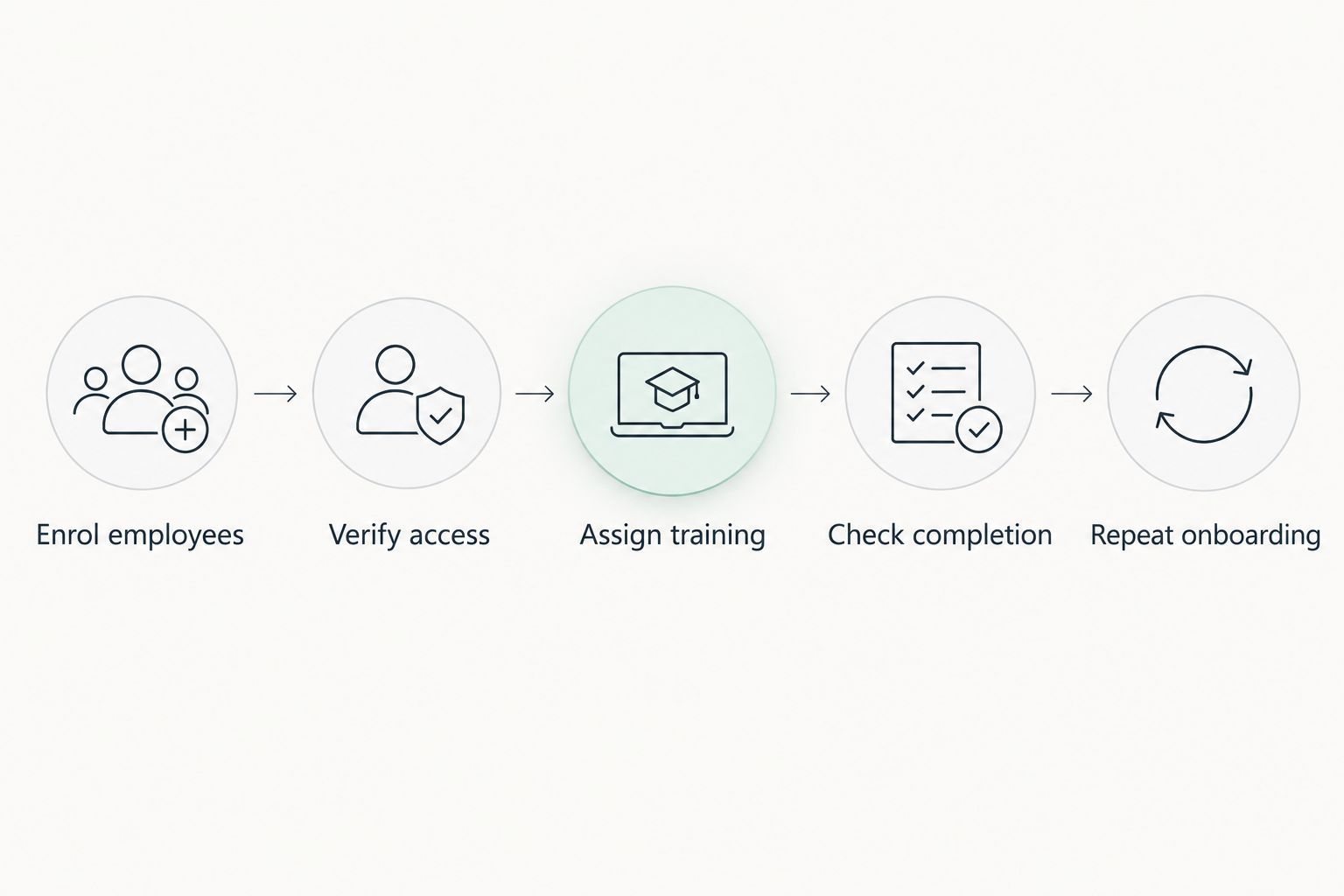
The finish line includes completion evidence and a repeatable new-starter process.
How to rank the pilot results
Rank completed pilots by your agreed acceptance criteria, not by the number of setup screens. A useful 2026 decision order is:
- Pass required controls: Exclude candidates that cannot satisfy essential access, data-handling or reporting requirements.
- Compare administrator effort: Prefer less hands-on work for the same completed workflow.
- Compare elapsed time: Identify which delays are product dependencies and which belong to your organisation.
- Compare exceptions: Examine failed access, incorrect assignments and reporting discrepancies.
- Compare repeatability: Prefer the workflow that remains manageable when employees join, move or leave.
Do not award a speed win to an incomplete pilot. If one candidate has produced accurate completion records while another has only sent invitations, they have reached different milestones.
Keep the raw task log alongside the verdict. Procurement, IT and the training owner should be able to see why the preferred option won without relying on a presentation summary.
Which security awareness platform should you choose?
Choose the platform that passes your required controls and produces repeatable completion evidence with the least ongoing administrator work. That is the default recommendation for an undecided buyer.
Choose Cyber Aware when its security awareness onboarding pilot meets those conditions. Apply the same standard to KnowBe4, Proofpoint and your existing learning platform; brand familiarity is not a substitute for the result.
For a 2026 rollout, put the tested workflow and unresolved dependencies into the implementation agreement. Your launch plan should identify owners, acceptance evidence and the conditions that stop a wider rollout.
FAQ
What's the fastest security awareness platform to onboard?
The fastest suitable security awareness platform is the one that completes your required enrolment, access, training and reporting workflow with the least effort. Compare candidates using the same pilot and finish line rather than account-creation time.
How do I measure security awareness platform onboarding speed?
Measure elapsed time and administrator effort from approved setup to verified learner completion and accurate reporting. Record approval delays, support requests and rework separately so the comparison explains where time goes.
Is automatic enrolment faster than uploading an employee list?
Compare both workflows against your actual employee changes and setup requirements. An employee import tests the initial launch; an ongoing enrolment test shows the work required when staff join or leave.
Does single sign-on mean onboarding is finished?
No, single sign-on addresses access rather than the entire onboarding workflow. You still need to verify employee selection, assignments, completion records and reporting.
Should phishing simulations be included in the onboarding pilot?
Include phishing simulations when they are part of your required rollout scope. Test delivery separately from training access, with approved mail settings and a documented process for resolving delivery problems.
Can I use my existing learning platform for security awareness training?
Yes, if it can deliver suitable content and provide the assignments and completion evidence your programme requires. Assess phishing simulation and reporting requirements separately before treating it as a complete replacement.
What should stop a wider security awareness rollout?
Stop expansion when required access, assignment accuracy or completion reporting fails. Resolve the cause and repeat the affected test before adding more employees.
One last thing
Ask someone who missed the vendor demonstration to onboard the next employee using only the written instructions. Stay silent while they work.
That handover exposes hidden knowledge: the permission nobody documented, the group someone selected from memory or the report that needs manual correction. A rollout is not repeatable if it depends on remembering the demonstration.