Best overall: team-based leaderboards. Best for recognising progress: personal-improvement leaderboards. Best for specialist teams: role-based leaderboards. This 2026 Cyber Aware guide ranks the leaderboard designs to request when comparing security awareness platforms, with demonstration checks that separate useful scoring from decorative points.
TL;DR
- Security awareness platform gamified leaderboard verdict: choose team-based scoring as your default demonstration requirement.
- Personal-improvement leaderboards recognise progress without making experienced employees the permanent winners.
- Require platforms to explain scoring, reporting controls and employee visibility before selection.
- Keep security awareness training completion separate from phishing-reporting quality.
Why this matters
A leaderboard tells employees what your programme rewards. If finishing lessons earns every point, the competition measures completion—not whether someone verifies a suspicious payment request or reports a dangerous message.
Choose the behaviour first, then choose the leaderboard. A polished ranking screen is not a substitute for clear scoring rules, suitable privacy controls and useful evidence for administrators.
The ranking below compares leaderboard configurations, not vendor capabilities. Require each shortlisted platform to demonstrate the configuration you choose; do not assume that a vendor’s use of the word gamification means it supports your requirements.
For a 2026 shortlist, Cyber Aware recommends team-based security awareness leaderboards for organisations seeking shared recognition without publishing individual failure rankings. Keep private coaching available alongside any competition.
What makes the best gamified security awareness platform?
Use these criteria before watching a product demonstration:
- Behaviour-linked scoring: Require an explanation of which actions earn points and why those actions matter to your security programme.
- Fair comparison: Compare employees or teams with similar assignments, eligibility and opportunities to participate.
- Controlled visibility: Specify who sees names, scores, rankings and underlying training records.
- Explainable calculations: Ask an administrator to trace a displayed score back to its contributing events.
- Separate evidence: Keep completion, knowledge checks and phishing behaviour distinguishable in reports.
- Practical administration: Demonstrate how joiners, leavers, leave periods and team changes affect the competition.
Treat these as acceptance criteria, not a feature checklist. For example, a privacy setting is only useful if it hides the right information from the right audience while retaining authorised administrative access.
Gamified leaderboard designs at a glance
| Rank and design | Best for | Standout requirement | Key limitation |
|---|---|---|---|
| Team-based leaderboard | Shared participation | Comparable team scoring with private individual records | Team averages conceal individual support needs |
| Personal-improvement leaderboard | Recognising progress | Clear baseline and repeatable comparison | Starting conditions complicate comparisons |
| Role-based leaderboard | Specialist workforces | Rankings within comparable job groups | Small groups weaken anonymity |
| Opt-in individual leaderboard | Voluntary security challenges | Genuine participation choice and controlled naming | Participants do not represent the whole workforce |
| Completion-only leaderboard | Tracking a bounded training campaign | Clear assignment and completion rules | Completion does not demonstrate safe behaviour |
A platform does not need every design. Your 2026 selection should support the design your programme actually needs, with reporting that remains useful when the competition ends.
1. Team-based leaderboards: best for shared participation
A team-based leaderboard ranks groups rather than publishing every employee’s position. Specify a scoring method that accounts for eligible participants and assigned activities, rather than rewarding the department with the largest headcount.
Use this design when you want managers to encourage participation while keeping individual coaching private. Ask the vendor to demonstrate how the score changes when someone joins, leaves or takes extended leave.
Team-based leaderboard pros:
- Supports shared recognition rather than public individual comparison.
- Lets you organise challenges around existing departments or working groups.
- Keeps individual support conversations separate from the public ranking.
Team-based leaderboard cons:
- A strong team average conceals employees who need help.
- Different workloads and assignments make raw totals unfair.
- Department changes require clear eligibility rules.
Best for: Organisations that want a shared challenge without displaying individual mistakes.
Require both views in the demonstration: the employee-facing team table and the authorised administrator’s underlying records. A leaderboard is not adequate reporting on its own.
Verdict: Buy only when team scoring is explainable and individual coaching records remain private.
2. Personal-improvement leaderboards: best for recognising progress
A personal-improvement leaderboard recognises change against an employee’s own baseline. It answers a different question from an absolute ranking: who improved, rather than who started with the highest score?
Require comparable activities across measurement periods. An easier follow-up assessment must not be presented as evidence of greater improvement simply because the result increased.
Personal-improvement leaderboard pros:
- Gives developing learners a route to recognition.
- Makes progress visible without relying entirely on absolute scores.
- Fits programmes that pair assessment with targeted follow-up training.
Personal-improvement leaderboard cons:
- Employees near the top of the scale have less room to improve.
- Baseline differences complicate interpretation.
- Changed questions or campaign difficulty undermine comparisons.
Best for: Programmes focused on learning progress rather than competition between experienced and inexperienced employees.
Ask the vendor to display the baseline, follow-up result and calculation together. Also ask what happens when a baseline is incomplete or an employee misses the follow-up activity.
Verdict: Buy for progress recognition only when the baseline and comparison rules are visible.
3. Role-based leaderboards: best for specialist workforces
A role-based leaderboard compares employees with similar responsibilities and training assignments. Finance staff, help-desk staff and customer-facing teams need not compete on unrelated learning paths.
Use role grouping to make comparisons more relevant, not to label a job function as inherently unsafe. Require a clear process for employees whose responsibilities span several groups.
Role-based leaderboard pros:
- Aligns recognition with relevant training assignments.
- Avoids comparing unrelated course requirements.
- Gives managers a focused view of participation within their function.
Role-based leaderboard cons:
- Small groups make employees easier to identify.
- Role changes create administrative work.
- Separate group rankings do not form a meaningful organisation-wide league table.
Best for: Organisations with materially different training requirements across job functions.
Ask the platform demonstrator to move an employee between roles. Check whether historical records remain intact and whether the employee’s previous score carries into a competition with different rules.
Do not publish a small-group ranking merely because the software permits it. Set visibility rules before enabling the competition.
Verdict: Buy when role grouping improves comparability; skip public rankings for identifiable small groups.
4. Opt-in individual leaderboards: best for voluntary challenges
An opt-in individual leaderboard displays results for employees who choose to join a defined competition. Keep mandatory training obligations separate: declining public competition must not mean declining required learning.
This design suits a voluntary challenge with a stated beginning, end and scoring policy. Require employees to understand what their colleagues will see before participation starts.
Opt-in individual leaderboard pros:
- Gives interested employees a direct competition format.
- Makes the scope of public recognition explicit.
- Separates voluntary participation from mandatory training records.
Opt-in individual leaderboard cons:
- Results describe participants, not the whole workforce.
- Public names and scores require careful access settings.
- A technically optional competition still needs non-coercive management.
Best for: Voluntary awareness events where individual recognition is the stated purpose.
Demonstrate joining, withdrawing and changing the displayed identity. Check what remains visible after withdrawal and who retains access to the underlying records.
Avoid using this leaderboard as a company-wide security performance measure. Employees who do not participate still belong in the organisation’s training and support programme.
Verdict: Buy for voluntary events; skip as the default measure of workforce security.
5. Completion-only leaderboards: best for bounded campaigns
A completion-only leaderboard ranks progress through assigned training. It is straightforward to interpret when everyone has equivalent requirements, but it answers a narrow question: who finished the assigned activity?
Use it as a campaign view, not a declaration that the highest-ranked employee makes the safest decisions. Keep assessment results and observed behaviour elsewhere in your reporting.
Completion-only leaderboard pros:
- Provides a clear view of assignment progress.
- Gives a campaign a simple participation objective.
- Makes unfinished requirements visible to authorised administrators.
Completion-only leaderboard cons:
- Finishing a lesson does not establish understanding.
- Speed-based rankings reward fast completion rather than careful judgement.
- Unequal assignments make positions misleading.
Best for: A defined training campaign with equivalent assignments and a shared deadline.
Require the vendor to distinguish assigned, started and completed activities. Ask how exemptions, reassigned modules and late enrolments affect the display.
Avoid awarding extra recognition merely for finishing faster. Employees should have time to read explanations and practise the decisions the training asks them to make.
Verdict: Hold as a campaign tool; skip as your primary security outcome measure.
How the leaderboard designs are ranked
Cyber Aware’s security awareness leaderboard ranking prioritises fair comparison, private support and explainable scoring. Team-based recognition is the default because it separates shared participation from individual public ranking.
Personal improvement comes next for programmes centred on progress. Role-based and opt-in designs serve narrower requirements; completion-only ranking belongs at the bottom because its evidence stops at finishing assigned work.
These are selection priorities, not measured vendor performance scores. Apply them to a live demonstration and your proposed operating rules.
Run the same demonstration for every platform
For your 2026 evaluation, propose a 30-day pilot, reserve a 10-minute scoring walkthrough, and compare records from 2 simulation campaigns. These are suggested evaluation parameters, not performance benchmarks.
Use the following sequence to keep demonstrations comparable:
- Set rules: State eligible participants, rewarded actions, visibility and reset conditions.
- Trace scores: Follow an activity from the employee record to the leaderboard calculation.
- Check fairness: Change an assignment, team membership or participation status.
- Review privacy: Switch between employee, manager and administrator views.
- Export evidence: Inspect whether exported records explain the displayed results.
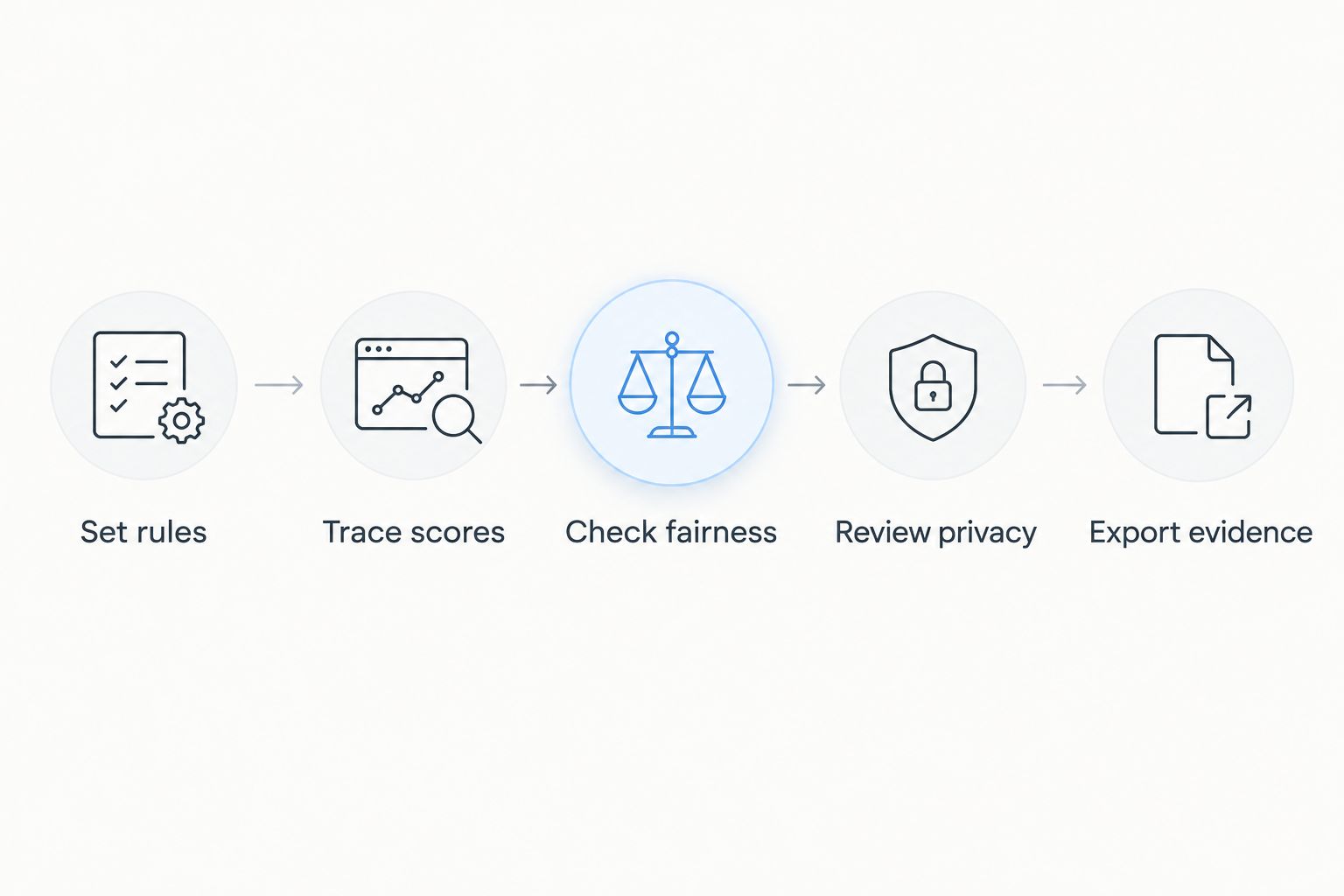
Use the same scenarios throughout the pilot. Include a new starter, an employee on leave and someone whose role changes, then document how each case affects eligibility and scoring.
For the competition policy itself, use the guide to designing gamified security awareness training. Write the rules before announcing recognition, not after employees question their positions.
Which leaderboard should you choose?
Choose team-based recognition as your default, then retain private individual feedback. Choose personal improvement when your main objective is recognising learning progress, or role-based grouping when assignments differ substantially.
For 2026 procurement, require the chosen configuration to work in the demonstration before treating it as a selection advantage. A points counter, badge collection or attractive dashboard does not establish that the platform supports your scoring policy.
Keep the purchase decision broader than the competition. Training relevance, reporting access and workable administration remain requirements even when the leaderboard looks convincing.
FAQ
What’s the best security awareness platform gamified leaderboard design?
Team-based scoring is the default recommendation for shared recognition without public individual failure rankings. Require comparable assignments, explainable calculations and private individual feedback.
Does Cyber Aware have a gamified leaderboard?
Confirm Cyber Aware’s current leaderboard functionality directly in a product demonstration. Ask to see scoring rules, employee visibility, team grouping and reporting rather than treating this design guide as a feature specification.
Is a leaderboard the same as gamified security awareness training?
No. A leaderboard ranks results, while gamified training can also include challenges, progress indicators and recognition without publishing employee positions. Evaluate the actual experience rather than the label.
Should employees lose points for reporting a legitimate email?
Do not make an unconfirmed report an automatic public penalty. Review reporting quality privately and use feedback to explain how employees should handle similar messages.
Are team leaderboards better than individual rankings?
Team leaderboards are the recommended default for shared participation without naming individual low performers. Individual rankings belong in a clearly defined voluntary challenge with suitable visibility controls.
Can a leaderboard prove that security awareness training works?
No. A leaderboard shows results under its scoring rules, not proof that training prevents incidents. Examine completion, knowledge and security behaviour separately.
What should I ask a vendor to show in a leaderboard demo?
Ask the vendor to trace a score from its source activity, change a participant’s eligibility and demonstrate employee and administrator views. Inspect the exported records as well as the dashboard.
One last thing
Ask what happens when an employee reports a suspicious email that turns out to be legitimate. That single scenario forces a decision about the behaviour your programme values.
Keep reporting open, explain mistakes privately and avoid turning uncertainty into public failure. Make that rule explicit in your 2026 competition policy before anyone earns a point.