Best overall: externally delivered simulations with narrowly scoped exceptions. Best for a single mail platform: a native simulation tool. Best for delivery troubleshooting: a self-managed sender. This Cyber Aware guide ranks delivery approaches for phishing simulation email deliverability in 2026—not vendors by an unverified inbox-placement score.
TL;DR
- Cyber Aware’s phishing simulation email deliverability guide prioritises verified inbox placement over vendor delivery counters.
- Externally delivered simulations with scoped exceptions are the default for testing staff responses to external email.
- Native simulation tools suit single-platform environments; mailbox injection serves a different testing objective.
- Confirm inbox placement, usable links and human activity before comparing phishing click rates.
Why this matters
A phishing simulation cannot measure employee behaviour if the message never reaches the employee. Equally, a message accepted by your mail server has not necessarily landed in the inbox. Quarantine, junk filtering and later removal are separate outcomes.
Choose the delivery method before comparing template libraries or campaign dashboards. Your gateway, mailbox policies and simulation exceptions determine what the exercise actually tests.
For a 2026 procurement decision, separate two objectives: testing people and testing email defences. An approved simulation exception supports the first objective; it does not demonstrate that a real attacker would pass your filters. Keep those conclusions apart in management reports.
What makes the best phishing simulation delivery setup
Rank tools against these criteria before accepting a demonstration:
- Verified inbox placement: Reconcile campaign records with message traces and recipient-folder checks. Server acceptance alone is insufficient.
- Narrow exception scope: Identify the exact senders, infrastructure and simulation URLs covered by each exception. Avoid disabling protection across the organisation.
- Route transparency: Establish whether messages travel through external SMTP, originate inside the mail platform or enter through a mailbox API.
- Usable simulation content: Confirm that links, landing pages and reporting actions work under your normal browser and endpoint controls.
- Activity attribution: Separate automated link inspection from employee actions before interpreting click results.
- Repeatability: Retest after material changes to mail routing, security policies or sending infrastructure.
For Microsoft environments, review the guide to allowlisting phishing simulation emails in Microsoft 365 alongside the current platform documentation. A configuration intended for one route is not a universal fix for every gateway.
Delivery approaches at a glance
The order below is a selection priority for staff-awareness exercises, not a measured vendor performance league table. A lower-ranked approach becomes the right choice when its use case matches your objective.
| Rank and approach | Best for | Standout characteristic | Key limitation |
|---|---|---|---|
| 1. External SMTP with scoped exceptions | Staff exercises using an external email route | Preserves an external delivery path while authorising the simulation | Exception design affects realism and requires validation |
| 2. Native mail-platform simulation | Organisations standardised on one mail platform | Keeps the exercise within the platform’s administrative environment | Results do not establish performance across other mail systems |
| 3. Mailbox API injection | Behaviour exercises where gateway traversal is not the objective | Places messages through an authorised mailbox interface | Does not test the external SMTP path |
| 4. Self-managed SMTP simulation | Teams diagnosing their own sending infrastructure | Gives administrators direct responsibility for sender configuration | Adds infrastructure, monitoring and maintenance work |
1. External SMTP: best for external-route staff exercises
An externally delivered simulation sends messages through an SMTP route into your organisation. Configure narrowly defined simulation exceptions where required, then verify the resulting mailbox placement rather than trusting the campaign’s send status.
This is the default recommendation when you want staff to encounter a simulated external message. The route remains external, but any exception changes which security decisions the message encounters.
External SMTP pros:
- Supports an exercise built around incoming external email.
- Gives mail administrators a delivery path to investigate through message traces.
- Lets you evaluate sender configuration, gateway handling and mailbox placement separately.
External SMTP cons:
- Overly broad exceptions weaken the exercise’s security boundaries.
- Gateway acceptance does not prove inbox placement.
- Changes to sending infrastructure require configuration review.
Best for: Organisations testing employee recognition and reporting of externally delivered phishing messages.
Ask each shortlisted supplier to explain the complete route, including any connector or exception it requires. Reject instructions that amount to turning off protection without a clear scope and removal procedure.
Verdict: Buy only after a tenant-specific pilot confirms placement and narrowly scoped exceptions.
2. Native simulation: best for a single-platform environment
A native simulation tool runs within your mail platform’s administrative environment. Microsoft’s Attack simulation training is an example within Microsoft 365; evaluate the current documented requirements against your tenant before choosing it.
Native administration is a reason to shortlist this approach, not proof of better deliverability. You still need to check where messages appear and whether the exercise works for the users and clients in scope.
Native simulation pros:
- Keeps simulation administration within an existing platform environment.
- Provides a clear starting point for organisations standardised on that platform.
- Lets your mail administrators assess the exercise alongside tenant configuration.
Native simulation cons:
- Platform-specific results do not establish delivery behaviour elsewhere.
- Native origin is not equivalent to an ordinary external sending route.
- Mixed-platform organisations need separate validation for each environment.
Best for: Organisations whose pilot population uses one mail platform and whose administrators prefer platform-native operations.
For your 2026 shortlist, ask whether native delivery matches the exercise’s purpose. A convenient administrative route is useful, but it should not be presented as evidence that the organisation’s external defences were bypassed.
Verdict: Buy for platform fit after confirming the delivery route and reporting boundaries.
3. Mailbox injection: best for isolated behaviour exercises
Mailbox injection uses an authorised API or mailbox interface rather than the ordinary external SMTP route. Its purpose is to place a simulation message where a user can encounter it without relying on that external route.
This approach separates a staff exercise from gateway delivery testing. That distinction is valuable when your question is whether employees recognise and report a message—not whether your perimeter admits it.
Mailbox injection pros:
- Separates employee-behaviour testing from external SMTP troubleshooting.
- Makes the delivery mechanism explicit when documented correctly.
- Supports an exercise designed around the mailbox encounter itself.
Mailbox injection cons:
- Does not establish external gateway traversal.
- Requires review of application permissions and access scope.
- Inbox placement still does not prove that links or reporting actions work.
Best for: Security teams deliberately isolating the employee-response part of a phishing exercise.
Require the supplier to identify requested permissions, affected mailboxes and the process for revoking access. Do not accept an inbox-placement result as evidence of strong external email deliverability when the message never used external SMTP.
Verdict: Hold unless behaviour-only testing is your explicit objective.
4. Self-managed SMTP: best for delivery diagnostics
A self-managed simulation sender puts sending configuration and infrastructure under your team’s control. Your administrators take responsibility for the sending domain, authentication, mail service, delivery logs and simulation endpoints.
That control supports detailed troubleshooting. It also makes operational discipline part of the exercise: an unreliable sender produces an unreliable test, regardless of the quality of the phishing template.
Self-managed SMTP pros:
- Gives your team direct access to sender configuration and logs.
- Supports investigation of specific routing and authentication problems.
- Lets administrators define the exercise’s infrastructure boundaries.
Self-managed SMTP cons:
- Requires ongoing administration and monitoring.
- Leaves your team responsible for securing simulation infrastructure.
- Adds operational work beyond campaign design and staff follow-up.
Best for: Teams with mail-delivery expertise investigating their own infrastructure or running tightly controlled technical exercises.
Do not choose this route merely because the software is easy to install. Assign ownership for domain configuration, access control, landing-page safety and infrastructure removal before sending anything to employees.
Verdict: Skip for routine deployment unless your team owns the operational work.
Run a delivery pilot before choosing a tool
Use a written pilot protocol rather than a supplier’s demonstration mailbox. Cyber Aware’s phishing simulation email deliverability recommendation is to validate the complete employee experience, not just the sending event.
The following is a suggested pilot design, not an industry benchmark or a delivery guarantee:
- Representative mailboxes: Start with 30 test mailboxes if your organisation is large enough. Cover the routes, policies and clients you actually use; smaller organisations should prioritise coverage over this suggested count.
- Controlled sends: Run 2 campaign rounds after configuration is stable. Record any changes between rounds instead of silently combining unlike results.
- Placement checks: Inspect placement on arrival and again after 24 hours. This adds a later check for changes in message location or accessibility.
- Interaction checks: Open the message, follow the simulation link safely and use the normal reporting process.
- Evidence review: Reconcile sender records, mail-system evidence and observed mailbox outcomes before approving rollout.
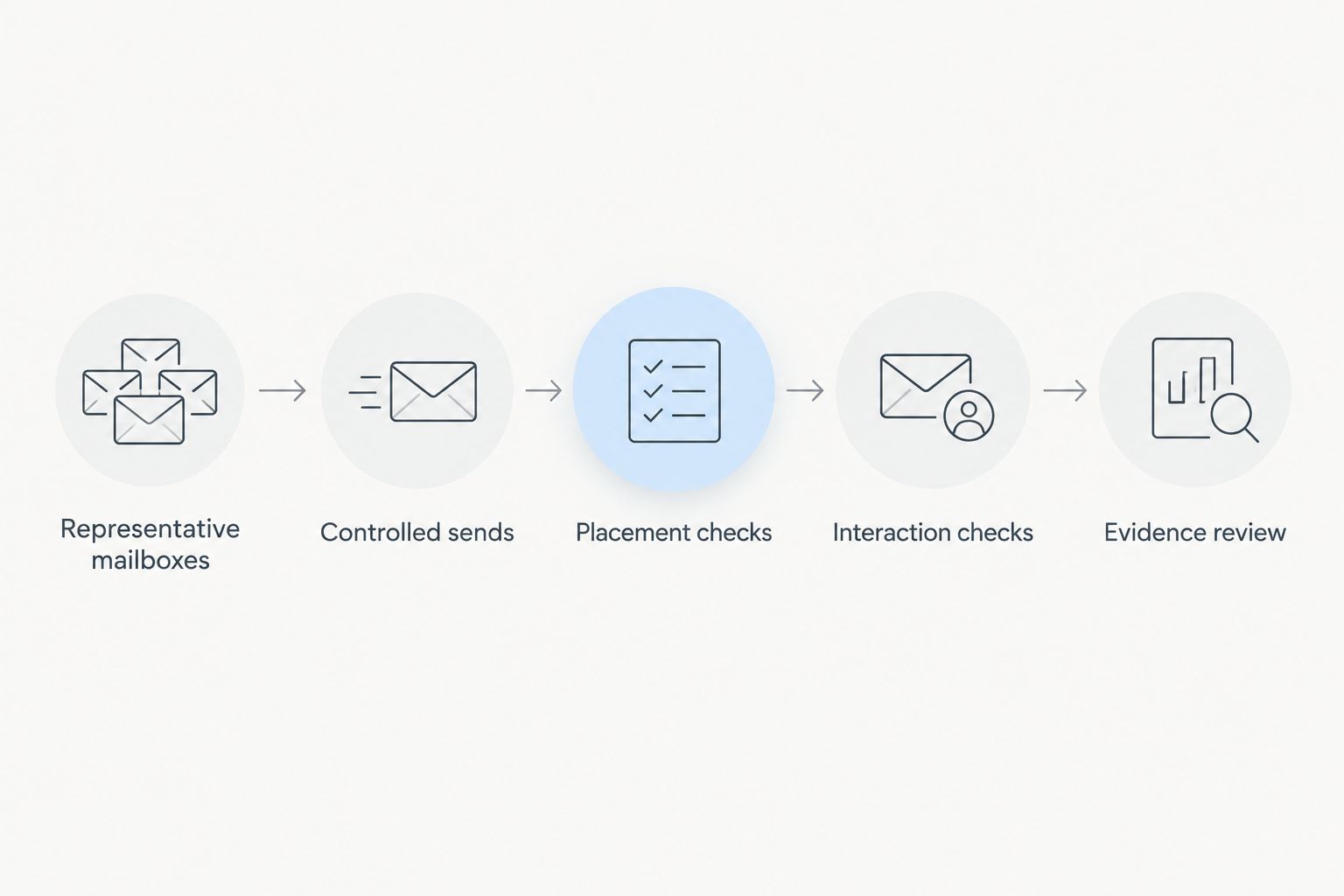
Approve the route only after checking placement and the employee’s interaction path.
Keep the pilot population representative rather than merely convenient. Include different mail routes when they exist, and document exclusions such as inactive accounts or shared mailboxes. An exercise cannot support conclusions about recipients it did not meaningfully test.
Measure delivery without inflating the result
For 2026 reporting, define every delivery status before calculating a rate. Different systems use the same word for different events.
| Status | What it establishes | What it does not establish |
|---|---|---|
| Sent | The sending system recorded a send event | Recipient-system acceptance |
| Accepted | The receiving system accepted the message | Inbox placement |
| Inbox confirmed | The message was observed in the inbox | Employee attention |
| Quarantined | A security control held the message | Employee exposure |
| Link accessible | The simulation destination opened during a controlled check | Human engagement across the campaign |
| Human action verified | Evidence supports an employee interaction | That every recorded interaction was human |
Calculate inbox-placement rate as confirmed inbox placements divided by the messages in your defined test population. State exclusions separately, and do not silently remove failed deliveries from the denominator.
Keep click-rate reporting separate. Security scanners inspect links, so a recorded request alone does not establish an employee click. Ask how each shortlisted tool identifies automated activity and which events remain uncertain.
A clean delivery report should let another administrator reproduce the conclusion. Keep campaign identifiers, timestamps, message identifiers and relevant configuration records together. Record the date and environment scope rather than presenting a tenant-specific result as a universal product characteristic.
How this ranking works
This Cyber Aware ranking puts external-route visibility first for staff-awareness exercises, followed by administrative fit, permission boundaries and operational burden. Those priorities explain the order; they do not imply measured differences between named vendors.
During a 2026 evaluation, score each candidate against the same mail routes and acceptance criteria. Keep native delivery, API injection and external SMTP results in separate categories unless your report clearly explains their differences.
Treat a supplier’s delivery claim as a definition to investigate. Ask what was counted, where placement was checked, which exceptions were active and whether the result applies to your environment. Evidence from another tenant does not replace your own pilot.
Which delivery approach should you choose?
Choose external SMTP with narrowly scoped exceptions as the default for an external-message staff exercise. Choose a native tool when platform fit is the deciding requirement. Use mailbox injection when you deliberately want to isolate behaviour from gateway traversal.
Reserve self-managed sending for teams that accept infrastructure ownership. More control is not automatically a better operational choice.
For the final 2026 decision, make verified placement, usable simulation links and safe configuration mandatory acceptance criteria. Compare the learning experience only after those conditions are met. A larger template library cannot repair an invalid delivery test.
FAQ
What’s the best tool for phishing simulation email deliverability?
The best choice is the tool that demonstrates inbox placement through the delivery route your exercise requires. For an external-message staff exercise, start with external SMTP and narrowly scoped simulation exceptions, then validate the result in your environment.
Does a delivered status mean the phishing simulation reached the inbox?
No. A delivered status can describe receiving-system acceptance rather than inbox placement. Confirm the status definition and check mailbox placement before reporting employee exposure.
Is mailbox injection better than SMTP for phishing simulations?
Mailbox injection is better suited to isolating employee behaviour from external delivery controls. SMTP is the relevant route when your exercise requires an externally delivered message; the methods answer different questions.
Should I disable spam protection for a phishing simulation?
Do not disable spam protection across your organisation to run a simulation. Use documented, narrowly scoped configuration appropriate to the delivery method and have your mail-security administrator review it.
Why does a simulation show clicks before staff open the email?
Automated security inspection can request simulation links before an employee interacts with the message. Review activity evidence and the tool’s scanner-handling method before counting those requests as human clicks.
Can I compare delivery percentages from different phishing vendors?
Compare delivery percentages only when their definitions, populations, routes and exception conditions match. An SMTP acceptance rate and an API inbox-placement rate are not equivalent measures.
How often should I recheck phishing simulation delivery?
Recheck after material changes to mail routing, security policies, simulation infrastructure or delivery configuration. Repeat placement and interaction checks before interpreting results from the changed environment.
One last thing
A successful simulation exception is evidence that an authorised training message reached its destination—not evidence that a real attack would reach it. Put the delivery method and active exceptions beside the campaign results so executives do not confuse employee testing with gateway testing.
Keep the simulation’s purpose visible wherever you report its outcome. That single reporting habit prevents a technically successful campaign from becoming a misleading security claim.