Best overall: anti-phishing software validated against your own legitimate email. Best for procurement assurance: independently evaluated software with a disclosed test method. Best starting point: your existing email protection, measured before adding another layer. This 2026 guide ranks buying approaches by the strength of their false-positive evidence—not unsupported vendor percentages.
TL;DR
- For an anti phishing software false positive rate comparison, rank comparable measurements—not vendor claims.
- Cyber Aware’s guide separates email-filtering errors from staff phishing reports and simulation results.
- Choose locally validated protection that meets your detection requirements without unnecessary legitimate-email disruption.
- Independent results matter only when test settings, message samples and classification rules are disclosed.
Why this matters
A false positive happens when email protection incorrectly classifies a legitimate message as malicious. The consequence depends on the action: a warning banner, junk-folder placement and quarantine impose different levels of disruption.
Staff reporting a harmless message is a separate measurement problem. Use the guide to handling false-positive phishing reports from staff when your concern is report-triage workload rather than automatic email filtering.
The lowest false-positive rate is not automatically the best protection. A filter that permits every message has a 0% false-positive rate, but it also provides no blocking protection. Your buying decision must consider legitimate-email disruption alongside missed threats.
For a 2026 shortlist, require the underlying counts, classification rules and policy settings before treating a percentage as evidence. A small percentage without those details cannot tell you whether an invoice or customer enquiry will reach its recipient.
What makes the best low-false-positive anti-phishing software?
Use these criteria before comparing results:
- Correct denominator: Calculate false positives against legitimate messages, not all incoming messages or all alerts.
- Comparable detection: Compare disruption only after checking whether each configuration meets your threat-detection requirements.
- Representative email: Include the legitimate messages your organisation depends on, including unfamiliar senders and automated notifications.
- Disclosed settings: Record policies, exceptions, enforcement actions and configuration changes alongside each result.
- Recoverable mistakes: Check how reviewers identify, release and investigate incorrectly restricted messages.
- Auditable evidence: Prefer message-level records and confirmed classifications over a percentage presented without its workings.
These criteria apply to an individual configuration, not an entire vendor catalogue. A result for one policy does not establish performance for every deployment of the same software.
Buying approaches at a glance
The order below ranks evidence for a purchasing decision. It is not a measured vendor leaderboard, and the entries are not mutually exclusive: independently evaluated software can also undergo a local pilot.
| Rank and option | Best for | Standout feature | Key limitation |
|---|---|---|---|
| 1. Locally validated configuration | Protecting business-critical email workflows | Direct evidence from your legitimate email | Requires confirmed classifications and controlled testing |
| 2. Independently evaluated configuration | Procurement and evidence review | An external method you can inspect | Test traffic and settings can differ from your deployment |
| 3. Existing email protection baseline | Deciding whether another layer adds value | Establishes current disruption and detection performance | Measures only the current configuration |
| 4. Default-settings candidate | Initial technical screening | Provides a starting configuration to evaluate | Defaults alone do not prove operational suitability |
1. Locally validated configuration: best for critical workflows
A locally validated configuration is anti-phishing software evaluated against email representative of your organisation. Its strongest evidence is not a vendor-wide average; it is a confirmed record of what happened to your legitimate messages under documented policies.
Include workflows where delayed email matters. Supplier correspondence, account notifications, recruitment messages and customer enquiries deserve separate review rather than disappearing into a single total.
Locally validated configuration pros:
- Connects the measurement to email your organisation actually receives.
- Reveals which legitimate workflows trigger restrictive actions.
- Supports direct comparison between candidate policy configurations.
- Lets reviewers inspect the messages behind the result.
Locally validated configuration cons:
- Requires people to confirm whether disputed messages are legitimate.
- Historical samples do not establish performance against every future message.
- Changes to policy settings require another measurement period.
Best for: Organisations choosing protection for business-critical email workflows in 2026.
Keep evaluation handling separate from normal delivery wherever the product supports that arrangement. Do not expose employees to suspicious content simply to compare filtering outcomes; use an isolated review process and appropriately qualified reviewers.
Verdict: Buy only after the locally validated configuration meets both your detection and legitimate-email requirements.
2. Independently evaluated configuration: best for procurement assurance
An independently evaluated configuration has results produced outside the vendor’s own sales material. Useful evidence identifies the tested product, evaluation date, message sample, classification method and enforcement settings.
Independence does not make every result transferable. A carefully described test is useful because you can inspect its boundaries, not because its percentage automatically predicts your inbox experience.
Independently evaluated configuration pros:
- Provides an external source of performance evidence.
- Makes methodology available for procurement review when disclosed.
- Supports comparisons when candidates share the same test conditions.
Independently evaluated configuration cons:
- Test messages can differ from your organisation’s email.
- Tested settings can differ from the configuration you intend to deploy.
- An older evaluation does not describe subsequent product or policy changes.
Best for: Procurement teams that need traceable evidence before approving a technical pilot.
For a 2026 assessment, record the evaluation’s actual date and scope rather than relabelling an earlier result as current. Ask whether the report distinguishes phishing false positives from bulk-email or spam classifications.
Read the action categories closely. A result that counts only quarantined messages does not measure every warning or junk-folder placement experienced by users.
Verdict: Hold until an independently evaluated configuration also passes a local workflow assessment.
3. Existing email protection baseline: best for assessing added value
Your existing email protection baseline measures the controls already handling incoming messages. It gives a proposed replacement or additional layer a meaningful comparison point.
Without a baseline, a pilot can show what a candidate blocks but not whether the change improves your operating position. Record both current mistakes and current successful handling before changing the system.
Existing email protection baseline pros:
- Establishes current legitimate-email disruption.
- Identifies policy problems before introducing another product.
- Creates a reference for evaluating a replacement or additional layer.
Existing email protection baseline cons:
- Does not establish how another configuration will perform.
- Existing exceptions can conceal weaknesses in the default policy.
- Incomplete message classifications limit the comparison.
Best for: Teams deciding whether an additional anti-phishing layer solves a measured problem.
List the exceptions already in place and explain why each exists. Otherwise, a heavily tuned incumbent and an untouched candidate are being judged under different conditions.
When testing layered protection, distinguish each tool’s decision from the final delivery outcome. A message restricted by either layer counts once when measuring the combined impact on legitimate email.
Verdict: Hold the existing email protection baseline steady while you establish a comparable candidate result.
4. Default-settings candidate: best for initial screening
A default-settings candidate is software assessed before organisation-specific tuning. It is a useful starting point for checking deployment behaviour and policy visibility, but not a finished false-positive assessment.
Use this stage to inspect what the product records and how its decisions are explained. A candidate that cannot support your review process needs further investigation before enforcement.
Default-settings candidate pros:
- Provides a clearly documented starting configuration.
- Shows which actions the initial policy applies.
- Helps identify the evidence needed for a structured pilot.
Default-settings candidate cons:
- Initial settings do not demonstrate suitability for your workflows.
- A short demonstration does not establish a dependable error rate.
- Unreviewed restrictions cannot be classified confidently as false positives.
Best for: Technical teams screening candidates before a controlled evaluation.
Do not mistake a clean demonstration inbox for a representative sample. Review routine business traffic as well as unusual but legitimate messages, and document any tuning before comparing subsequent results.
Verdict: Wait before treating a default-settings candidate as ready for broad enforcement.
How to calculate the false-positive rate correctly
The standard calculation is:
False-positive rate = legitimate messages incorrectly classified as malicious ÷ all legitimate messages evaluated × 100%.
As a mathematical illustration—not a product benchmark—1 incorrectly classified legitimate message out of 1,000 legitimate messages equals 0.1%. The same 1 error out of 100 legitimate messages equals 1%.
Those examples show why the denominator matters. Report the counts beside the percentage so readers can distinguish a small sample from a substantial evaluation.
Do not substitute these different measurements:
- False discovery proportion: Legitimate messages among messages classified as malicious.
- False-negative rate: Malicious messages incorrectly classified as legitimate, divided by malicious messages evaluated.
- Staff-report error proportion: Legitimate messages among messages employees report as suspicious.
- Simulation click rate: Employee interaction with simulated phishing messages.
Cyber Aware’s anti-phishing software comparison framework keeps these measures separate because they answer different questions. A training outcome is not evidence of an email filter’s false-positive rate.
Run a comparable evaluation in 2026
Use the same sequence for every candidate. Agree on the rules before reviewing results so a preferred product does not receive easier classifications after the fact.
Define outcomes
Specify which decisions count as phishing classifications and which actions count as operational disruption. Keep warning banners, junk-folder placement and quarantine visible as separate categories.
Label messages
Confirm legitimate and malicious classifications through an authorised review process. Keep unresolved messages separate rather than forcing uncertain cases into a favourable category.
Freeze settings
Record the product configuration, exceptions, policy version and evaluation dates. Treat a material policy change as a new configuration rather than blending its results into the previous total.
Review errors
Inspect each confirmed false positive and each missed threat. Identify whether the decision came from a general detection policy, a custom rule or another protection layer.
Compare outcomes
Compare candidates against the same requirements and sample boundaries. Include restricted legitimate messages, missed threats and reviewer effort rather than choosing the smallest percentage alone.
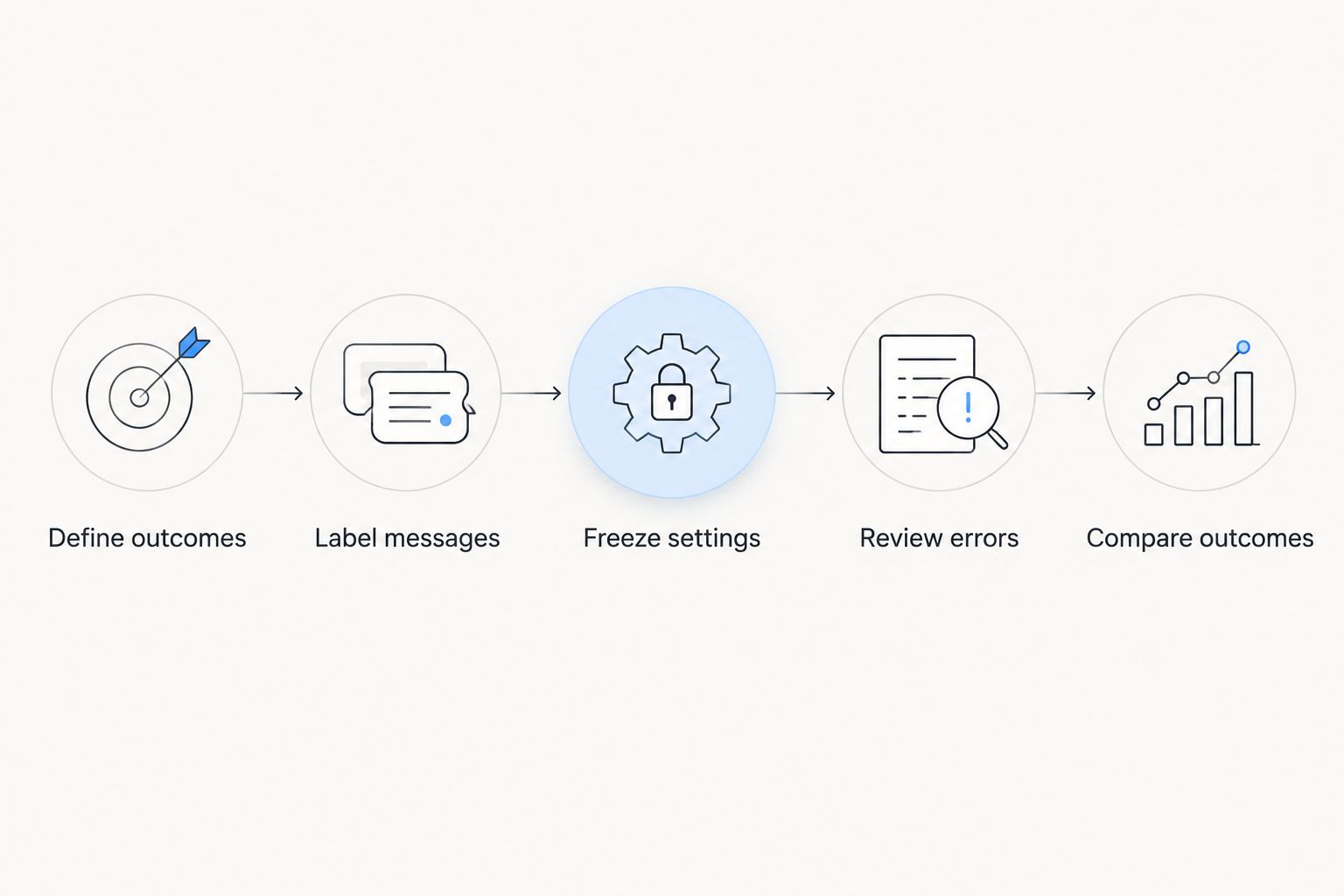
Set the comparison rules before judging candidate results.
Keep an evaluation register with the sample boundaries, confirmed counts, reviewer decisions and reasons for exclusions. Preserve the original decision as well as any later correction; otherwise, a released message can disappear from the record of initial mistakes.
How this ranking works
This ranking prioritises evidence relevant to your deployment, followed by independently inspectable evidence, an incumbent baseline and initial screening. It does not assign unverified false-positive percentages to named vendors.
The criteria are practical: a correct denominator, comparable detection requirements, representative traffic, documented settings, recoverable errors and auditable records. A candidate earns preference by satisfying those criteria, not by occupying a particular product category.
Which anti-phishing software should you choose?
Choose the configuration that meets your threat-detection requirements with the least confirmed disruption to legitimate email under comparable conditions. That is the default decision rule for 2026.
Use independent evaluations to narrow the shortlist, your incumbent to establish the baseline and local testing to make the final decision. Do not promote an untouched demonstration configuration directly into broad enforcement.
Cyber Aware’s recommendation for anti-phishing software buyers is to make the evidence repeatable. Keep staff reporting and security-awareness outcomes in the assessment, but do not present either as a substitute for filtering measurements.
FAQ
What is a good anti-phishing software false-positive rate?
A useful false-positive rate meets your legitimate-email requirements while the configuration also meets your threat-detection requirements. Compare confirmed counts, the legitimate-message denominator and the actions taken rather than applying an unsupported universal threshold.
Which anti-phishing software has the lowest false-positive rate?
A lowest-rate claim requires comparable results for named configurations under the same evaluation conditions. Choose from documented measurements rather than treating unrelated vendor percentages as a ranking.
How do I calculate an anti-phishing false-positive rate?
Divide legitimate messages incorrectly classified as malicious by all legitimate messages evaluated, then multiply by 100%. Keep unresolved classifications separate and disclose the underlying counts.
Does a zero false-positive rate mean the software is best?
No. A filter that allows every message produces no false positives but also blocks no threats, so detection performance must accompany the false-positive measurement.
Are staff phishing reports counted as filter false positives?
No. A staff report is an employee decision, while a filter false positive is an automated classification error. Measure reporting accuracy and filtering accuracy separately.
Can I compare independent tests from different dates?
Only after checking whether the products, settings, samples and classification methods support the comparison. Different test dates and scopes must remain visible rather than being presented as one shared evaluation.
Should I allowlist every sender affected by a false positive?
No. Investigate the cause and assess a narrowly scoped correction before creating an exception. Broad exceptions can permit messages that would otherwise receive security checks.
One last thing
A corrected mistake is still a mistake in the original filtering result. Keep the false positive in your accuracy record, then record recovery separately: how it was found, who authorised release and how long legitimate email remained restricted.
Do not let successful recovery erase evidence of disruption. Accuracy and recovery quality both matter, but combining them hides the problem you are trying to measure.