Best overall: Gophish. Best for a separate client–server workflow: King Phisher. Best for authorised social-engineering assessments: Social-Engineer Toolkit (SET). This 2026 guide matches each open source phishing simulation tool to a specific job, with the operating responsibilities you take on when you host it yourself.
TL;DR
- Cyber Aware’s open source phishing simulation tool recommendation is Gophish for teams running self-hosted email awareness campaigns.
- King Phisher suits technical teams that specifically want a separate client–server campaign workflow.
- Social-Engineer Toolkit suits authorised security assessments, not routine employee learning administration.
- Choose phishing simulation software by campaign workflow, data handling and maintenance responsibility—not template count alone.
Why this matters
An open source licence gives you access to code. It does not assign someone to secure the server, manage email delivery, interpret results or help employees learn after a test.
Separate the sending tool from the awareness programme before choosing software. Cyber Aware’s guide to measuring security culture beyond phishing click rates explains the broader measurement question: whether people recognise, report and respond to suspicious requests.
For a 2026 shortlist, the decisive question is ownership. Choose self-hosting only when someone owns both the infrastructure and the learning outcome. An unowned campaign server is not a security programme.
What makes the best open source phishing simulation tool?
Cyber Aware’s phishing simulation shortlist uses these criteria:
- Campaign workflow: You need a practical way to organise recipients, messages, landing pages and results without assembling every campaign from scratch.
- Reporting quality: Events need context. A recorded link visit is not automatically evidence that an employee deliberately clicked.
- Deployment responsibility: Identify who manages hosting, certificates, access, backups and security updates before deployment.
- Data minimisation: Prefer exercises that record the necessary behaviour without collecting real passwords or unnecessary employee information.
- Learning follow-through: Decide how employees receive an explanation and how reported messages reach the security team.
- Project suitability: Review the licence, documentation, release history and unresolved security issues for the exact version under consideration.
Do not treat an old tutorial as evidence of present-day suitability. Your 2026 approval should cover the actual release and dependencies you intend to deploy, not just the project name.
Open source phishing simulation tools at a glance
| Tool | Best for | Standout capability | Key limitation |
|---|---|---|---|
| Gophish | Self-hosted email awareness campaigns | Browser-based campaign management with an API | Your team operates the infrastructure and learning follow-up |
| King Phisher | Separate client–server campaign workflows | Dedicated client connected to a campaign server | The client and server both become part of your deployment responsibility |
| Social-Engineer Toolkit | Authorised social-engineering assessments | Broader assessment toolkit beyond email campaign management | Not a substitute for employee learning administration |
These are use-case recommendations, not measured performance rankings. The table does not establish current maintenance status, delivery success or behaviour-change results for any project.
1. Gophish: best phishing simulator for email awareness campaigns
Gophish is an open source phishing framework with a browser-based administration interface. Its documented workflow includes recipient groups, email templates, landing pages, sending profiles and campaign results; it also exposes an API for programmatic administration.
That structure makes Gophish the strongest default here when your task is an authorised email awareness exercise. You get a campaign-oriented application rather than a general-purpose assessment toolkit.
Gophish pros:
- A browser-based interface brings the main campaign components together.
- Recipient groups and reusable templates support repeatable exercises.
- Campaign results provide a starting point for reviewing recipient interactions.
- The API supports integration work when your team can build and maintain it.
Gophish cons:
- Self-hosting leaves server security, access control and updates with your organisation.
- Recorded events still require interpretation; automated scanning can complicate click analysis.
- You must arrange the learning response and reporting process around the simulation.
Best for: An IT or security team that wants a focused email campaign tool and accepts operational ownership.
For a 2026 evaluation, test the full workflow rather than stopping when the first message arrives. Confirm that your approved recipient list imports correctly, the landing page teaches the intended lesson, and the exported results answer the question your programme owner asked.
Gophish is not the right default merely because someone can install it. If nobody owns the campaign after deployment, pause the rollout rather than leaving a sensitive application unattended.
Verdict: Buy into Gophish as the default shortlist choice for self-hosted email awareness campaigns.
2. King Phisher: best simulator for a client–server workflow
King Phisher is an open source phishing campaign toolkit built around a separate client and server. Its project documentation describes campaign management, email templates and campaign tracking within that architecture.
The distinction is the working model. Choose King Phisher when a dedicated client connected to a campaign server fits your technical environment, rather than assuming every campaign administrator should work through a browser.
King Phisher pros:
- The separate client and server provide a distinct administration model.
- Campaign management and tracking belong to the same toolkit.
- Source access lets technical teams inspect the implementation before approval.
King Phisher cons:
- You need to evaluate and maintain both sides of the client–server arrangement.
- Deployment suitability depends on the dependencies and operating environment of the selected release.
- Campaign tracking does not replace employee education or a documented reporting process.
Best for: Technical teams with a specific requirement for King Phisher’s client–server approach.
Before approving King Phisher in 2026, inspect its repository activity, installation requirements and unresolved issues. Then reproduce the proposed deployment in an isolated environment using the organisation’s own approval process.
Do not select King Phisher because an installation walkthrough looks straightforward. Select it only when the architecture solves a real requirement and your team can support the exact build it intends to use.
Verdict: Hold King Phisher on the shortlist until its deployment and maintenance requirements pass your technical review.
3. SET: best toolkit for authorised social-engineering assessments
Social-Engineer Toolkit, commonly called SET, is an open source framework from TrustedSec for social-engineering assessments. Its documented scope includes spear-phishing and website-related assessment capabilities, making it broader than a dedicated employee phishing campaign application.
That breadth serves assessors working under a defined engagement scope. It is a different fit from a recurring awareness programme whose main needs are employee communication, learning follow-up and management reporting.
SET pros:
- Its broader assessment scope suits work beyond a standard email awareness campaign.
- A menu-driven interface organises its assessment capabilities.
- Source access supports technical inspection within an authorised engagement.
SET cons:
- Assessment capability does not provide a complete employee learning workflow.
- Operators need clear authorisation, boundaries and technical competence.
- A broad toolkit adds unnecessary scope when you only need routine email simulations.
Best for: Security assessors conducting explicitly authorised social-engineering engagements.
For a 2026 employee awareness shortlist, keep the distinction clear: SET is an assessment option, not the default programme administration choice. Define the permitted actions and data handling before any assessment begins, and keep real credentials outside the exercise.
If your requirement is simply to send an approved simulation and give employees constructive feedback, start with a campaign-focused application instead.
Verdict: Skip SET for routine employee awareness administration; retain it for separately authorised assessments.
How this shortlist is ranked
The ranking prioritises fit to the reader’s task: recurring email awareness campaigns first, a specialist campaign architecture second, and broader assessment work third. Gophish leads because its documented campaign workflow directly matches the main query.
The feature descriptions draw on the Gophish User Guide and API documentation, the King Phisher project documentation, and TrustedSec’s SET project documentation. These sources describe capabilities; they do not establish comparative effectiveness or confirm that a particular release meets your organisation’s security requirements.
Cyber Aware’s 2026 recommendation is therefore a shortlist decision, not a claim of hands-on testing or a guarantee about current project maintenance. Review the exact release before approval.
Run a controlled pilot before choosing
A useful pilot tests administration, measurement and employee support—not just delivery. Use the following sequence to decide whether self-hosting fits your organisation.
Define scope
Document the business owner, approved audience, purpose and stop conditions. Agree who can access individual results and prohibit collection of real passwords.
Choose a workplace scenario that teaches a relevant verification habit. Avoid emotionally manipulative themes that distract from the behaviour you want employees to practise.
Test delivery
Start with 10 controlled test accounts as a proposed pilot design, not as a benchmark for statistical confidence. Include the mailbox environments your organisation actually uses, and check the resulting experience before involving employees.
Coordinate narrowly scoped delivery settings with the mail administrator. Do not weaken general email protections to make an exercise appear successful.
Validate events
Use 2 message variants as a proposed starting design to check whether your reporting keeps separate exercises distinct. Confirm what each event means before presenting it as employee behaviour.
Inspect unexpected activity. Security scanners, link inspection and forwarded messages can complicate attribution, so a raw click total needs investigation rather than an automatic failure label.
Close the loop
Provide 1 clearly documented reporting channel for the pilot, so employees know where suspicious messages belong. Make sure someone monitors it and responds constructively.
Explain the exercise after participation and teach the verification step it was designed to practise. Preserve useful lessons without turning an individual mistake into public embarrassment.
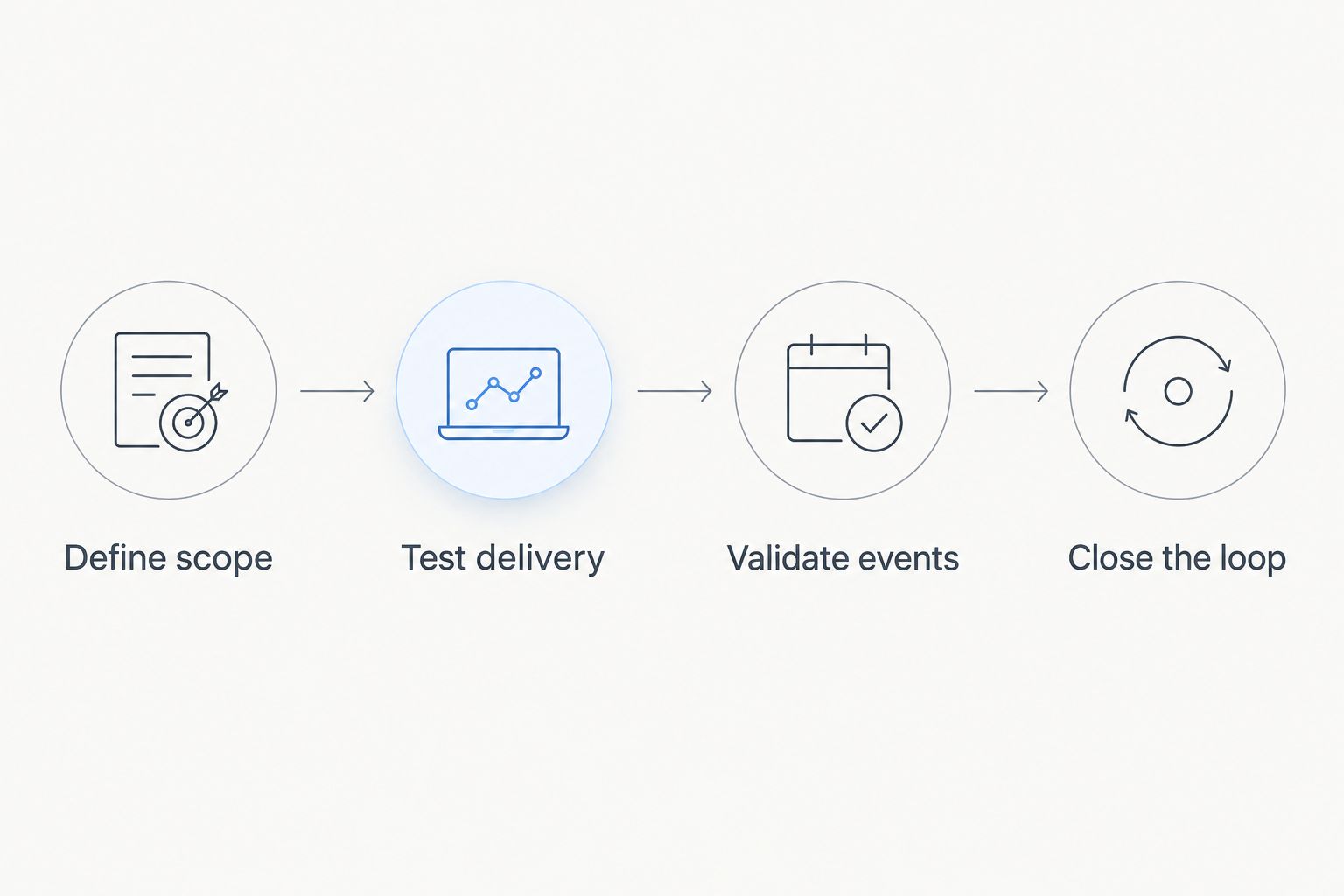
A simulation pilot is not finished when the message arrives.
Which phishing simulator should you choose?
Choose Gophish when you want a focused, self-hosted email campaign workflow and have an accountable technical owner. It is the default recommendation for an undecided reader, subject to release review and a controlled pilot.
Choose King Phisher only when its separate client–server model is a deliberate requirement. Keep SET for authorised assessment work rather than stretching it into an employee learning system.
If your organisation cannot assign infrastructure ownership, do not force an open source deployment. Write down the required campaign, reporting, learning and support workflows first, then evaluate another delivery model against those requirements.
The deciding factor in 2026 is not how convincing a demonstration looks. It is whether your team can operate the exercise safely, explain the results accurately and turn the lesson into a repeatable verification habit.
FAQ
What’s the best open source phishing simulation tool?
Gophish is the default recommendation for teams that want self-hosted email awareness campaigns. Its documented browser-based workflow covers recipients, templates, landing pages and campaign results; review the selected release before deployment.
Is Gophish better than King Phisher?
Gophish is the stronger default for a browser-based email campaign workflow, while King Phisher suits a specific preference for separate client and server components. Choose by operating requirements rather than treating either project as a universal winner.
Is Social-Engineer Toolkit suitable for employee awareness training?
SET is better suited to authorised social-engineering assessments than routine employee learning administration. A recurring awareness programme also needs constructive follow-up, reporting ownership and a process for helping employees improve.
Does open source mean a phishing simulator needs no maintenance?
No. Your organisation still needs to manage hosting, access, security updates, backups, email configuration and result handling. Assign those responsibilities before approving a self-hosted deployment.
Should a phishing simulation collect employee passwords?
No. Design the exercise to record the necessary interaction without collecting real passwords. Use a safe educational outcome and minimise personal information in campaign records.
Can email security scanners affect phishing simulation results?
Yes. Automated inspection can generate activity that complicates interpretation of recorded visits or clicks. Validate event behaviour in controlled accounts before labelling an event as an employee action.
Can a small business run an open source phishing simulator without IT staff?
A business without a competent technical owner should not default to self-hosting. Someone must remain responsible for the application, delivery configuration, employee data and follow-up—not just the initial installation.
One last thing
A quick phishing report can be a more useful learning outcome than a campaign with no recorded clicks. No clicks alone does not establish that employees recognised the threat; the message might not have reached them or attracted attention.
Before launching, ask your help desk what happens when someone reports the simulated email. If the answer is unclear, fix that workflow first—the exercise should practise the response you want during a real incident.