Best overall: Gophish for an IT-led small-business pilot. Best for technical customisation: King Phisher. This 2026 guide compares each free phishing simulation tool on campaign control, setup work, reporting and the follow-up your staff need.
TL;DR
- Gophish is the best free phishing simulation tool for small businesses with someone responsible for technical setup.
- King Phisher suits technical teams that need configurable phishing campaigns and can administer a client-server system.
- Open-source phishing simulation software still needs hosting, secure configuration, email delivery checks and staff follow-up.
- Cyber Aware’s phishing simulation guides suit small-business owners planning staff testing and security awareness training.
Why this matters
Choose the tool you can operate safely, not the one with the longest feature list. A phishing simulation involves more than sending a convincing message: you need authorisation, controlled delivery, useful measurements and a response when someone asks for help.
For broader planning, Cyber Aware provides a starting point alongside the practical selection criteria below. Keep the decision focused on the work your business can own, rather than treating an open-source download as a complete training programme.
A simulation should rehearse a safe behaviour. For example, an employee receiving a supplier bank-detail change should verify it through an established contact method, not simply avoid clicking a link.
What makes the best free phishing simulation tool?
Use these criteria for your 2026 shortlist. Treat any tool that fails your safety or administration requirements as unsuitable, regardless of its campaign features.
- Manageable setup: Identify who will configure the application, sending service, domains and access controls before choosing it.
- Campaign control: Require clear recipient selection, preview messages and a way to stop further sending.
- Useful reporting: Look for campaign results you can interpret alongside staff reports and mail-security activity.
- Safe landing pages: Explain the exercise without collecting real passwords or requesting sensitive information.
- Repeatable follow-up: Decide how employees will receive explanations, ask questions and practise the correct response.
- Operational ownership: Check project documentation, maintenance activity and deployment requirements before uploading employee details.
The strongest option is the one that meets these requirements with the least administration your team cannot sustain. Template quantity alone does not answer that question.
Free phishing simulation tools at a glance
This 2026 comparison separates use cases rather than assigning unsupported performance scores. Neither option removes your responsibility for infrastructure, authorisation or employee communications.
| Tool | Best for | Standout feature | Key limitation |
|---|---|---|---|
| Gophish | An IT-led small-business pilot | Browser-based campaign management with email templates and landing pages | Your administrator must configure and secure the deployment |
| King Phisher | Technical campaign customisation | A client-server approach to designing and managing phishing campaigns | Requires technical administration rather than an owner-only setup |
Both are open-source phishing simulation projects. Before deployment, inspect their official documentation and repository activity; inclusion here is not a claim about their current support arrangements or release schedule.
1. Gophish: best phishing simulation tool for an IT-led pilot
Gophish is an open-source phishing framework with a browser-based administration interface. It brings recipient groups, email templates, landing pages, sending profiles and campaign results into a campaign workflow.
Gophish is the default pick when you have an administrator who can own deployment and email delivery. Start with a straightforward link-based exercise rather than a credential-entry scenario.
Gophish pros:
- Browser-based campaign administration gives the operator a central working interface.
- Separate templates, groups and sending profiles support reusable campaign preparation.
- Landing-page configuration lets you build an explanation around the behaviour being tested.
- Campaign results support a structured review after the exercise.
Gophish cons:
- Deployment security, updates and access control remain your responsibility.
- Sending configuration needs administrator attention before you involve staff.
- Campaign events alone do not establish whether an employee recognised or reported the message.
Best for: A small business with an internal IT administrator or an authorised technical provider running a controlled pilot.
For your Gophish evaluation, prepare a sample message and explanation page before adding the staff list. Confirm that the recipient sees a useful learning message and that the administrator can distinguish the intended test from delivery problems.
Verdict: Buy into Gophish as your first pilot candidate when technical ownership is assigned. Skip a self-hosted rollout if nobody owns its upkeep.
2. King Phisher: best phishing simulation tool for custom campaigns
King Phisher is an open-source platform for creating and managing phishing campaigns through a client-server architecture. Its project documentation covers campaign configuration, email creation and result analysis.
King Phisher fits a technically capable operator who wants campaign configuration control. It is not the default recommendation for a business owner looking for a self-explanatory staff-training workflow.
King Phisher pros:
- Campaign configuration supports exercises built around your chosen scenario.
- A dedicated client-server structure separates the operating interface from the server.
- Campaign analysis provides material for reviewing exercise outcomes.
King Phisher cons:
- The client-server deployment adds administration responsibilities.
- Your team must assess installation requirements, dependencies and maintenance before use.
- Employee explanations and follow-up still require a separate training plan.
Best for: A technically experienced administrator with a defined customisation requirement, rather than a founder sending a first staff test alone.
Before selecting King Phisher, write down the specific campaign requirement that makes it preferable to Gophish. Then demonstrate that requirement in a controlled environment. If the distinction does not change what your employees learn, choose the simpler operating approach for your team.
Verdict: Hold until a technical owner demonstrates the required workflow and accepts responsibility for maintaining it.
How the tools are ranked
Gophish ranks first because its browser-based campaign workflow fits the narrower task of organising a small-business pilot. King Phisher occupies the technical-customisation slot because its client-server model demands a more deliberate administration decision.
The ranking prioritises manageable setup, campaign control, interpretable reporting and safe follow-up. It does not claim a measured advantage in delivery, detection, behaviour change or administration time.
For a 2026 decision, review deployment instructions and maintenance activity before proceeding. A familiar project name is not a substitute for that check.
Run a controlled pilot before testing the whole business
Make the first exercise a test of your process, not a surprise examination for everyone. The following pilot sizes and timings are planning recommendations, not performance benchmarks.
Authorise
Get written approval covering the audience, scenario, operator and collected data. Assign someone who can stop the exercise and someone who will answer employee questions.
Tell staff that the business conducts awareness exercises without disclosing the exact message or send time. Establish a learning purpose and avoid themes involving redundancy, personal emergencies or disciplinary threats.
Configure
Use infrastructure you control and restrict access to campaign administration. Build a landing page that explains the exercise without storing passwords, payment details or other sensitive information.
Set a written retention period for recipient lists and results. Keep access limited to people who need the information for the exercise and its follow-up.
Test delivery
Start with 5 test mailboxes controlled by the authorised operator. Check message delivery, link behaviour, the explanation page and the reporting route before involving the wider team.
Coordinate any simulation-specific mail configuration with your administrator. Do not disable protection across the organisation simply to make the test arrive.
Debrief
Use 7 days as an initial pilot review window and schedule a 15-minute debrief afterwards. Adjust that plan around working patterns rather than interpreting absence or leave as behaviour.
Show the relevant warning signs, demonstrate the reporting route and explain the correct response. Finish with a clear action employees can use on the next suspicious message.
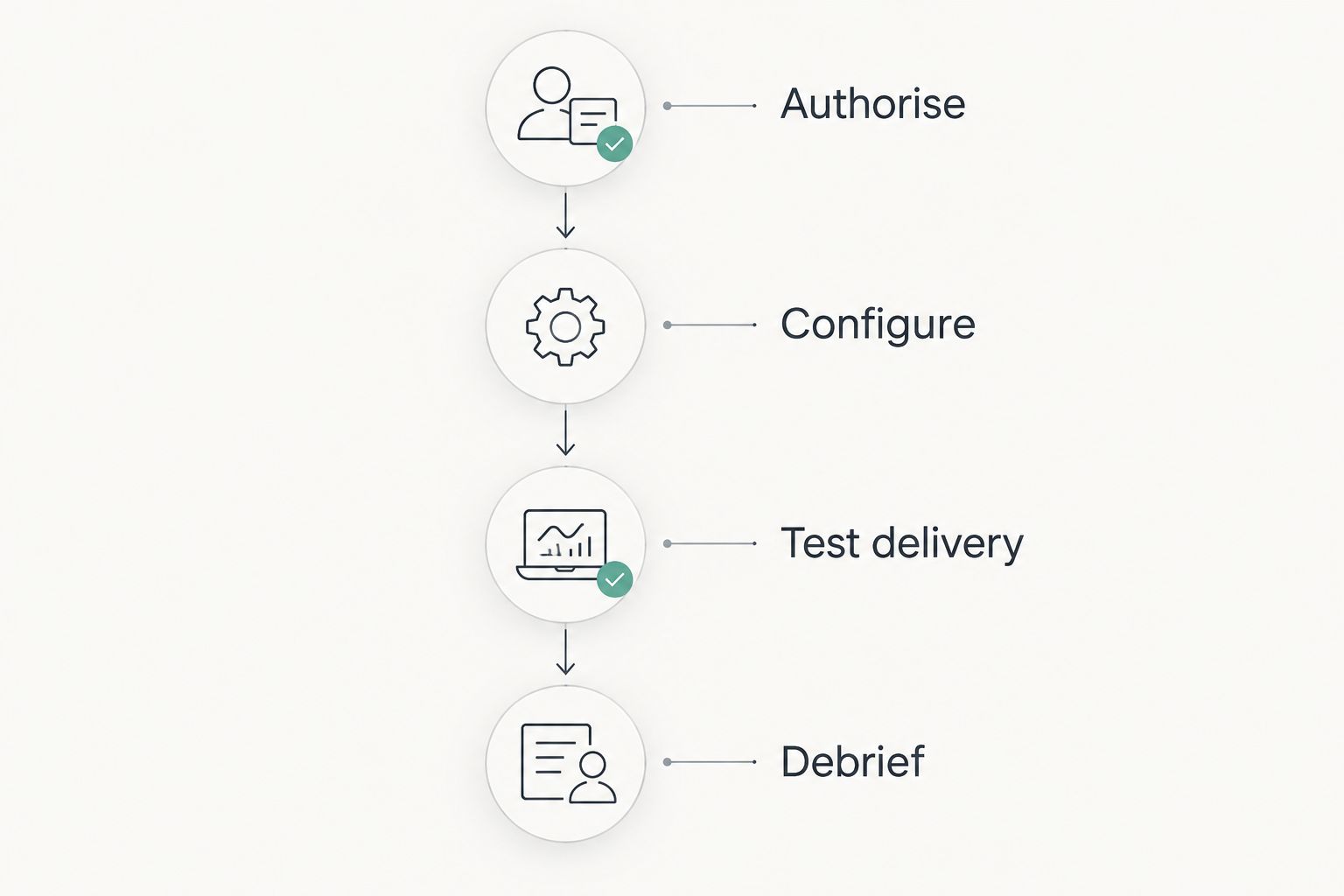
Test the delivery and reporting process before expanding the exercise.
Measure reporting, not just clicks
A click is an event, not a complete explanation of employee behaviour. Email-security systems can inspect links, so investigate automated activity before treating every recorded interaction as a staff action.
Record what happened after the message arrived. Did the employee report it, use the correct channel or verify the request independently? Those observations help you identify the behaviour to reinforce.
Use security culture measures beyond phishing click rates to shape the review. Keep campaign difficulty, audience and delivery conditions beside the results so you do not compare unlike exercises.
For a small team, explain individual events rather than relying on a percentage in isolation. A campaign report should lead to a training decision, a reporting-process improvement or a technical investigation—not a public ranking of employees.
Avoid these selection mistakes in 2026
Treating open source as an operating model
A software licence does not assign an administrator, secure the server or answer staff questions. Select the technical owner before selecting the deployment.
Write down who manages updates, backups, recipient data and campaign approval. If those responsibilities remain unassigned, pause the rollout.
Confusing simulations with email protection
Gophish and King Phisher are campaign tools, not substitutes for email filtering, account protection or payment verification procedures. Keep your defensive controls in place while testing staff responses.
A successful exercise also does not establish that the business can stop every real attack. Use the result to improve a specific behaviour rather than declare the organisation secure.
Collecting more data than the lesson needs
You do not need real employee passwords to explain a suspicious login request. Use an explanation page and record only the events required for your approved learning objective.
Review employee privacy obligations and applicable workplace requirements before launch. Avoid turning a training exercise into unnecessary surveillance.
Choosing complexity without a learning benefit
Customisation is useful when it supports a real scenario, such as verifying a supplier payment change. It is not useful merely because the operator can build an elaborate imitation.
Choose a scenario your employees recognise from their work. Keep the lesson specific enough that someone can explain the safe response afterwards.
Which phishing simulation tool should you choose?
Choose Gophish if you have technical ownership and want a focused first campaign. Choose King Phisher only when a technically experienced operator can show why its campaign approach fits a requirement Gophish does not meet for your deployment.
If nobody can manage infrastructure, email configuration and employee follow-up, do not start with a self-hosted tool. Define your requirements and seek an operating approach with clear responsibilities instead.
Use Cyber Aware’s phishing simulation guides to plan the surrounding awareness work. In 2026, the deciding question remains practical: who will turn the campaign result into a safer response?
FAQ
What's the best free phishing simulation tool for a small business?
Gophish is the default choice for a small business with an administrator responsible for deployment and campaign operation. Its browser-based workflow covers recipient groups, templates, landing pages and campaign results.
Is King Phisher better than Gophish?
King Phisher is the better fit only when its configurable client-server approach meets a specific technical requirement. Gophish is the first pilot candidate for a small business that wants a browser-based campaign workflow.
Can I run phishing simulations without IT staff?
Do not deploy a self-hosted phishing simulator without someone responsible for technical administration. An authorised external provider can fill that role, but the business still needs an owner for approval and staff follow-up.
Should a phishing simulation collect employee passwords?
No, a small-business awareness exercise should not collect real employee passwords. Use a controlled landing page that explains the warning signs and the correct reporting action.
Do phishing simulation tools replace spam filters?
No, phishing simulation tools test responses to controlled messages; spam filters help protect mailboxes from unwanted or malicious email. Keep technical protection and staff awareness as separate parts of your security programme.
What should I measure besides phishing clicks?
Measure reporting behaviour, use of the correct reporting channel and the response to the suspicious request. Investigate automated link inspection before attributing every recorded click to an employee.
Where should I start before selecting a phishing simulator?
Start with the behaviour you want employees to practise, then assign approval, technical operation and follow-up responsibilities. Cyber Aware’s phishing simulation guides can help you structure that planning.
One last thing
Test the reporting channel before testing the employee. Send an authorised sample to the person responsible for handling suspicious messages and confirm that the report reaches the right destination.
If the business cannot receive, recognise and act on that report, fix the response process first. An employee who spots the suspicious message needs a working next step.