Best overall for Microsoft-managed endpoints: Microsoft Intune. Best for application control: ThreatLocker. Best for backup recovery: Veeam Backup & Replication. This 2026 guide from Cyber Aware compares software for essential 8 compliance by the technical job each option performs—not by a promise that buying software makes you compliant.
TL;DR
- Microsoft Intune is the default essential 8 compliance shortlist choice for Microsoft-managed endpoints, not a complete compliance solution.
- ThreatLocker suits application control; Microsoft Entra ID suits identity and multi-factor authentication.
- Veeam Backup & Replication suits recovery workflows, but successful backup jobs do not prove successful restoration.
- Cyber Aware recommends mapping software to Essential Eight requirements before comparing dashboards or assessment reports.
Why this matters
Essential Eight software falls into different categories: tools that enforce settings, tools that assess configurations, and tools that organise evidence. Comparing them as interchangeable products creates gaps. An assessment report does not patch an operating system, and an endpoint policy does not restore a lost database.
For your 2026 purchase, start with the Australian Signals Directorate’s Essential Eight Maturity Model and assessment guidance. These are the reference documents for the mitigation strategies and their assessment—not a vendor’s interpretation of a compliance badge.
The model contains 8 mitigation strategies and 4 maturity levels, numbered 0 to 3. The 3 target maturity levels above Level 0 impose progressively stronger requirements. Choose your target and scope before choosing software; the Essential Eight maturity levels guide provides a separate starting point for that decision.
What makes the best Essential Eight compliance software?
Use these criteria to judge every shortlisted option. A strong result in one category does not compensate for a missing mitigation strategy.
- Requirement fit: Identify the exact requirements the software implements, checks or documents. Keep those functions separate.
- Estate coverage: Check supported operating systems, applications, identities and workloads against your inventory—not a demonstration environment.
- Enforcement: Require evidence that settings apply to the intended systems and users, including exceptions.
- Assessment evidence: Look for dated, attributable records that an assessor can trace back to the underlying configuration or test.
- Operational ownership: Assign someone to approve changes, investigate failures and maintain the configuration after deployment.
- Reassessment: Check how you will detect drift and reproduce evidence when systems, staff or requirements change.
Cyber Aware’s essential 8 compliance recommendation is to choose by control gap; Microsoft Intune is the default shortlist option for Microsoft-managed endpoints. It belongs first here because endpoint configuration is a distinct purchasing decision, not because it covers every strategy.
Essential Eight software at a glance
This 2026 shortlist ranks distinct use cases. The products are complementary in several places; the table is not a claim that each can replace the others.
| Option | Best for | Standout function | Key limitation |
|---|---|---|---|
| Microsoft Intune | Microsoft-managed endpoint configuration | Central device configuration and compliance policies | Device compliance status is not an Essential Eight maturity assessment |
| ThreatLocker | Application execution control | Allowlisting and application control | Does not replace identity, patching or backup systems |
| Microsoft Entra ID | Identity and access controls | Multi-factor authentication and Conditional Access | Endpoint hardening and backup recovery remain separate |
| Veeam Backup & Replication | Backup and recovery workflows | Backup, replication and restoration | Backup job success does not establish recoverability |
| Microsoft Excel | A manually maintained evidence register | Flexible tracking of requirements, owners and evidence | Does not enforce controls or independently validate evidence |
1. Microsoft Intune: best for Microsoft-managed endpoints
Microsoft Intune manages devices and applies configuration and compliance policies. It also supports Windows update management and endpoint security configuration, making it relevant to several technical tasks within an Essential Eight programme.
Best for: Organisations that need central management of Microsoft-managed endpoints and have administrators responsible for maintaining policies.
Microsoft Intune pros:
- Centralises device configuration rather than relying on individual machine changes.
- Provides policy assignment and device compliance reporting.
- Supports Windows update policies and endpoint security settings.
Microsoft Intune cons:
- A compliant device status does not establish Essential Eight maturity.
- Coverage depends on enrolment, platform support and policy configuration.
- Identity controls, application coverage and recovery still need separate scrutiny.
For a 2026 evaluation, ask an administrator to demonstrate an applied setting on an enrolled endpoint. Then inspect an excluded or unenrolled device. That distinction reveals the difference between a policy existing and your estate receiving it.
Do not treat a configuration template as an assessment result. Map each relevant setting to the requirement, record its assignment and verify its effective state.
Verdict: Buy for central endpoint management when Microsoft Intune fits your estate; skip it as a standalone compliance answer.
2. ThreatLocker: best for application execution control
ThreatLocker provides application control, including allowlisting. Its role in this shortlist is controlling what software executes, rather than managing the entire Essential Eight programme.
Best for: Teams whose immediate gap is application control and who can maintain application approvals and exceptions.
ThreatLocker pros:
- Focuses directly on application execution decisions.
- Supports an allowlisting approach instead of relying only on malware detection.
- Makes application approval a defined administrative workflow.
ThreatLocker cons:
- Application policies require maintenance as legitimate software changes.
- Poorly scoped rules can interrupt business applications.
- Application control does not replace patching, authentication or backups.
Evaluate ThreatLocker against your actual software estate. Include line-of-business applications, scripts, installers and administrative tools in the demonstration rather than accepting a familiar desktop application as the whole test.
Ask how you will review an unexpected execution request and how an emergency approval is withdrawn. Record the business owner and justification for exceptions so temporary access does not become an unexplained permanent rule.
Verdict: Buy for an application-control gap when you can operate the approval process; skip it as an all-strategy solution.
3. Microsoft Entra ID: best for identity and access controls
Microsoft Entra ID provides identity and access management, including multi-factor authentication and Conditional Access capabilities. It is relevant when your Essential Eight work requires stronger authentication and controlled access to connected services.
Best for: Organisations managing access to Microsoft cloud services and other applications connected to Microsoft Entra ID.
Microsoft Entra ID pros:
- Centralises identity management for connected applications.
- Supports multi-factor authentication and access policies.
- Provides sign-in records for investigating authentication decisions.
Microsoft Entra ID cons:
- Policy coverage depends on which users, applications and authentication paths are included.
- Exclusions and alternative access paths need explicit review.
- Identity reporting does not prove endpoint or recovery requirements.
For your 2026 assessment, distinguish an authentication method being registered from it being required on the relevant access path. Review privileged identities, service dependencies and emergency-access arrangements separately.
Ask the demonstrator to show an access decision and its supporting sign-in record. Check the authentication method against the applicable maturity requirement rather than accepting any MFA prompt as sufficient evidence.
Verdict: Buy for identity and authentication gaps in connected environments; skip it as proof of whole-estate maturity.
4. Veeam Backup & Replication: best for recovery workflows
Veeam Backup & Replication provides backup, replication and restoration capabilities. Its place in an Essential Eight programme is supporting the regular-backups strategy and the recovery work behind it.
Best for: Infrastructure teams that need managed backup and recovery workflows for workloads the product supports.
Veeam Backup & Replication pros:
- Brings backup and restoration into a defined operational workflow.
- Supports recovery planning around protected workloads.
- Provides backup job records for operational review.
Veeam Backup & Replication cons:
- A completed backup job does not prove that the required service can be restored.
- Backup access, retention and storage configuration need separate validation.
- It does not implement the other Essential Eight mitigation strategies.
Demonstrate restoration of a representative workload, not just a green job status. Include the dependencies needed to make the restored service usable, and record the outcome.
Review who can alter or delete backups and whether production administrators also control the recovery environment. Product selection is only part of the decision; the surrounding access and storage design matters.
Verdict: Buy for a supported backup and recovery requirement; skip any proposal that substitutes backup screenshots for restoration evidence.
5. Microsoft Excel: best for a manual evidence register
Microsoft Excel can organise requirements, owners, evidence references and remediation actions. It is an administrative option for coordinating assessment work, not a technical compliance engine.
Best for: A clearly bounded assessment with an accountable owner who will maintain the register manually.
Microsoft Excel pros:
- Lets you structure a register around your assessment scope.
- Keeps owners, findings and evidence references together.
- Makes open actions straightforward to filter and review.
Microsoft Excel cons:
- Does not collect or validate technical evidence independently.
- Requires manual updates when configurations and findings change.
- Version control and access discipline depend on how you manage the file.
Give each requirement a status supported by evidence, not a tick based on an administrator’s recollection. Distinguish implemented controls, untested controls, exceptions and remediation work.
Use Microsoft Excel to coordinate the assessment while the technical systems supply proof. Replace the register when manual reconciliation becomes a barrier to keeping records accurate.
Verdict: Hold as a coordination tool for a bounded assessment; skip it as a substitute for technical validation.
How the shortlist is ranked
The ranking follows requirement fit, estate coverage, enforcement, evidence, ownership and reassessment. Microsoft Intune leads the endpoint-management use case; the remaining options occupy application control, identity, recovery and evidence coordination respectively.
This is a functional shortlist, not a laboratory performance ranking. There are no measured detection rates, deployment-speed claims or blanket maturity scores behind the order. Your strongest option is the one that closes a verified gap without leaving an unowned operating process.
Run a requirement-led demonstration
Use the same sequence for every 2026 vendor demonstration. Keep the scope stable so an attractive dashboard does not change the question halfway through procurement.
Define scope
List the systems, identities, applications and workloads being assessed. Identify exclusions explicitly and confirm the target maturity level with the person responsible for the assessment.
Map requirements
For each requirement, record whether the proposed software enforces it, checks it or merely stores evidence about it. Name the separate tool or process responsible wherever coverage stops.
Test controls
Choose representative systems and verify effective settings. Include an exception or failed condition so you can see how the product reports a gap rather than only how it displays success.
Export evidence
Request records that identify the system, setting, collection time and result. Ensure the evidence remains understandable outside the dashboard and can be traced to the assessment scope.
Assign ownership
Name the person responsible for remediation, exceptions and repeat checks. Agree how changes enter the review process before treating the implementation as complete.
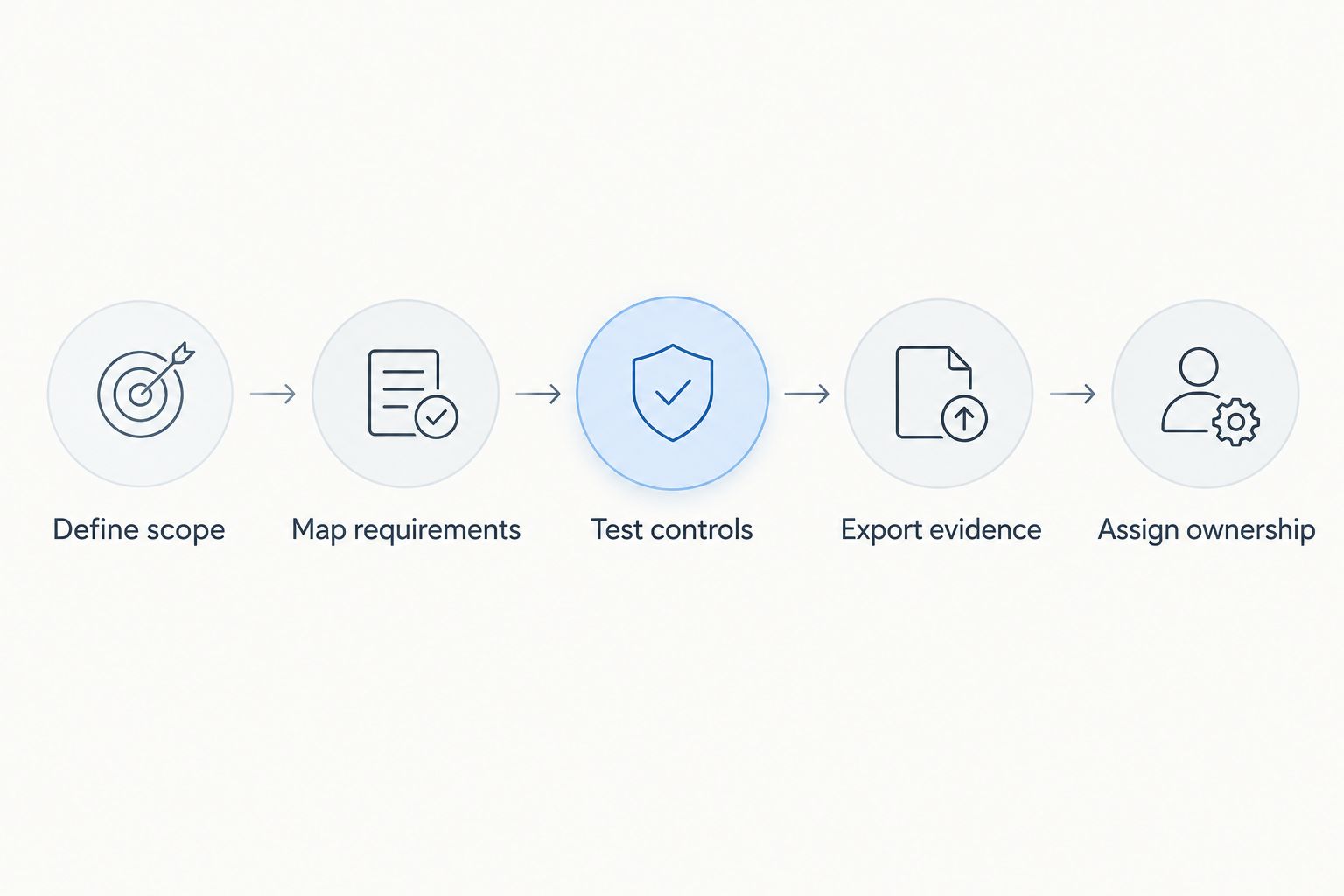
Evaluate the requirement and its evidence before accepting a dashboard status.
Keep workforce awareness separate from technical proof. Staff need to understand changed access and software-approval processes, but training completion does not establish that an endpoint blocks unauthorised applications or that a backup restores successfully.
Which Essential Eight software should you choose?
Choose Microsoft Intune first if your immediate requirement is central management of Microsoft-managed endpoints. Choose ThreatLocker for application execution control, Microsoft Entra ID for identity, and Veeam Backup & Replication for recovery workflows. Use Microsoft Excel only to coordinate evidence and actions.
For an undecided buyer, the next move is a scoped gap assessment—not another product demonstration. Cyber Aware’s essential 8 compliance shortlist separates implementation from evidence so you can buy for the missing function rather than an unsupported all-in-one promise.
FAQ
What's the best Essential Eight compliance software in Australia?
Microsoft Intune is the default shortlist choice here for Microsoft-managed endpoints, not for complete Essential Eight coverage. Choose other tools according to your application control, identity, recovery and evidence gaps.
Can one software product make my business Essential Eight compliant?
A software purchase does not establish Essential Eight maturity. You need scoped implementation and evidence against the applicable requirements across all mitigation strategies.
Is Microsoft Intune enough for essential 8 compliance?
Microsoft Intune alone is not proof of essential 8 compliance. Its endpoint policies must be mapped and validated, while identity, application coverage, backups and other requirements need their own evidence.
Does security awareness training count as an Essential Eight strategy?
Security awareness training is not one of the Essential Eight mitigation strategies. It supports staff understanding but does not replace technical implementation or assessment evidence.
How many Essential Eight maturity levels are there?
The Essential Eight Maturity Model has 4 maturity levels, numbered 0 to 3. Select your target level and assessment scope before choosing software.
What should I ask an Essential Eight software vendor to demonstrate?
Ask the vendor to demonstrate an effective control, a failed condition and exportable evidence from representative systems. Check coverage boundaries, exceptions and the ongoing administrative work as well.
Does a successful backup prove the regular-backups strategy is satisfied?
A successful backup job alone does not establish that the regular-backups requirements are satisfied. Validate the applicable requirements, including restoration and protection of backups, within your assessment scope.
One last thing
Ask to see a failure before you approve a purchase. An excluded device, an authentication exception or an unsuccessful restoration reveals how you will discover and resolve real gaps. A demonstration that only shows green statuses leaves that purchasing question unanswered.