Best overall starting point: the ACSC Essential Eight Assessment Process Guide. Best for Windows evidence collection: ASD’s Essential Eight Maturity Verification Tool. Best for a simple assessment register: a spreadsheet mapped to the official requirements. This 2026 guide compares what each option proves, where it falls short and how to build an essential 8 assessment you can defend.
TL;DR
- Cyber Aware recommends the ACSC guide as the starting point for an essential 8 assessment, not a dashboard score.
- ASD’s Essential Eight Maturity Verification Tool supports Windows checks; it does not replace a complete assessment.
- Microsoft Intune and Microsoft Secure Score provide supporting evidence, not an Essential Eight maturity verdict.
- Choose tools that connect each requirement to evidence, an owner and a repeatable verification step.
Why this matters
An Essential Eight assessment checks whether your controls meet defined requirements. A security dashboard answers a different question: what its connected systems can observe. Treating those answers as interchangeable creates gaps in your report.
The Australian Signals Directorate’s Essential Eight Maturity Model defines 8 mitigation strategies and 4 maturity levels, from Level 0 to Level 3. Start by choosing your target and assessment scope; the Essential Eight maturity levels benchmark explains the distinction between levels.
Cyber Aware’s essential 8 assessment recommendation for Australian SMBs is to pair the official assessment method with technical evidence, rather than rely on a single score. For your 2026 assessment, record the model version you use so later reviews compare like with like.
What makes the best Essential Eight assessment tools?
Judge each option against these criteria before looking at a demonstration:
- Requirement mapping: Can you trace each finding to the applicable Essential Eight requirement and target maturity level?
- Evidence quality: Does the output show actual configuration or behaviour, rather than an unsupported declaration?
- Scope visibility: Can you identify which devices, accounts, applications and services the evidence includes or excludes?
- Repeatability: Can another person repeat the check and understand why you reached the result?
- Remediation ownership: Can you assign gaps, record corrective action and retain evidence of retesting?
- Assessment boundaries: Does the tool make its limitations clear, including controls that need interviews or operational testing?
A tool earns a place in your assessment when it answers a specific requirement. An attractive summary score is not enough.
Essential Eight assessment tools at a glance
These are complementary options, not interchangeable assessment suites. The ranking puts the assessment method first, followed by tools for distinct evidence and reporting tasks.
| Option | Best for | Standout capability | Key limitation |
|---|---|---|---|
| ACSC Essential Eight Assessment Process Guide | Planning a defensible assessment | Official assessment methodology | Does not collect system evidence automatically |
| ASD Essential Eight Maturity Verification Tool | Windows technical checks | Repeatable technical verification | Does not cover the entire assessment |
| Microsoft Intune reporting | Managed-device configuration evidence | Policy and device reporting | Managed scope does not equal your whole environment |
| Microsoft Secure Score | Microsoft security improvement triage | Prioritised security recommendations | Score is not an Essential Eight maturity level |
| Spreadsheet evidence register | Tracking a small assessment | Flexible requirement-to-evidence mapping | Requires manual maintenance and review |
1. ACSC guide: best for assessment planning
The ACSC Essential Eight Assessment Process Guide explains how to approach an Essential Eight assessment. It is a methodology document, not an automated scanner, and belongs at the start of your toolkit.
Use the guide alongside the applicable Essential Eight Maturity Model. Together, they establish what you are assessing and how you should support the conclusions.
ACSC guide pros:
- Provides an official basis for structuring the assessment.
- Keeps your review focused on requirements rather than vendor scores.
- Helps separate assessment planning from evidence collection.
ACSC guide cons:
- Does not inspect devices, accounts or backup systems for you.
- Requires technical interpretation and evidence gathering.
- Does not manage remediation tasks or preserve your evidence register.
Best for: An SMB establishing its assessment scope, briefing an external assessor or checking a proposed assessment method.
For a 2026 assessment, record the exact publication version in your assessment plan. Keep that reference beside the scope and target maturity level, not buried in an email thread.
Verdict: Buy into this method first; skip any assessment approach that cannot explain its alignment with the official requirements.
2. ASD E8MVT: best for Windows technical verification
ASD’s Essential Eight Maturity Verification Tool, commonly shortened to E8MVT, supports technical verification of Essential Eight requirements in Windows environments. Use its output as evidence within the assessment, not as a substitute for the assessment itself.
Check the documentation for the version you intend to run. Confirm supported environments, prerequisites and which checks it performs before approving execution.
ASD E8MVT pros:
- Supports repeatable checks instead of relying entirely on screenshots.
- Produces technical results that an assessor can investigate.
- Gives Windows-focused teams a purpose-built evidence source.
ASD E8MVT cons:
- Windows checks do not establish coverage of other operating systems.
- Tool results still require interpretation against your scope and target.
- A technical check cannot establish every operational requirement.
Best for: An SMB or IT provider collecting Windows configuration evidence for an Essential Eight review.
Have an authorised administrator review execution requirements and output handling. Record the systems checked, collection date, tool version and relevant exceptions; otherwise, a result becomes difficult to reproduce or challenge.
Verdict: Buy into E8MVT for supported Windows checks; skip the assumption that its output alone proves maturity.
3. Microsoft Intune: best for managed-device evidence
Microsoft Intune provides device management, configuration reporting and compliance reporting. Those records can support an assessment of the devices and policies you manage through Intune.
Separate policy assignment from actual device state. An assigned policy tells you what you intended to enforce; device reporting helps you investigate whether the intended configuration reached the relevant devices.
Microsoft Intune pros:
- Connects configuration policies with managed devices.
- Helps identify reporting or compliance exceptions that need investigation.
- Provides a repeatable source for device-management evidence.
Microsoft Intune cons:
- Devices outside management remain outside that evidence source.
- A compliance result depends on the rules you configured.
- Device reports do not establish backup recoverability or every identity requirement.
Best for: An SMB already managing its endpoints through Intune and needing configuration evidence.
For your 2026 evidence pack, compare the device inventory with the assessment scope. Investigate missing devices and stale records before treating an export as representative of the environment.
Verdict: Buy into Intune reporting where it already manages your devices; hold off on treating it as a complete assessment tool.
4. Microsoft Secure Score: best for Microsoft security triage
Microsoft Secure Score provides security recommendations and a score based on supported Microsoft services and configurations. It helps you identify improvements to investigate in your Microsoft environment.
Use those recommendations to direct attention, then map relevant findings to Essential Eight requirements. Do not translate the score into a maturity level: the scoring systems measure different things.
Microsoft Secure Score pros:
- Presents security improvement actions in a central view.
- Helps structure discussions about Microsoft configuration gaps.
- Supports follow-up on changes within its reporting scope.
Microsoft Secure Score cons:
- Does not provide an Essential Eight maturity verdict.
- Its recommendations do not replace requirement-by-requirement assessment.
- Its reporting scope does not establish whole-of-business coverage.
Best for: An SMB prioritising Microsoft security improvements before detailed assessment work.
Ask your IT provider to show the underlying configuration evidence for relevant recommendations. A changed score is a useful signal, but your assessment needs the control result and supporting evidence.
Verdict: Buy into Secure Score for triage; skip it as proof of Essential Eight maturity.
5. Spreadsheet register: best for evidence coordination
A spreadsheet mapped to the official requirements gives a small team a straightforward assessment register. It records the assessment; it does not perform technical verification.
Create a row for each applicable requirement. Include the evidence reference, collection date, assessment result, gap owner and retest outcome so findings remain traceable.
Spreadsheet register pros:
- Makes requirement-to-evidence mapping explicit.
- Adapts to your scope without assuming a particular technology stack.
- Brings evidence from different systems into one review structure.
Spreadsheet register cons:
- Requires manual updates and quality checks.
- Cannot discover devices or verify configurations by itself.
- Needs access controls and version management to preserve a reliable record.
Best for: An SMB coordinating a bounded assessment across an internal owner and an IT provider.
Keep sensitive technical exports in an appropriately controlled repository. Reference them from the register rather than copying credentials, recovery secrets or unnecessary personal information into cells.
Verdict: Buy into a spreadsheet for coordination; skip any checkbox-only template with no evidence references.
Build an assessment workflow around the tools
For a 2026 assessment, use a defined sequence rather than collecting screenshots and deciding what they mean afterwards. The assessment register should connect the official requirements to technical results and unresolved gaps.
Define scope
List the systems, users, services and business boundaries under review. Identify exclusions explicitly, including outsourced services, and establish who supplies evidence for them.
Map requirements
Map the target maturity requirements to evidence sources. Mark checks that need configuration inspection, interviews or operational testing instead of assuming every requirement has a dashboard report.
Collect evidence
Gather dated exports, relevant configuration records and test results. Record where each source came from and which part of the scope it represents.
Verify gaps
Compare the evidence with the requirements and investigate contradictions. An enabled setting, an assigned policy and observed operation are not automatically the same finding.
Retest changes
Assign each gap to an owner and verify corrective action. Keep the original finding and the retest evidence so your report shows what changed.
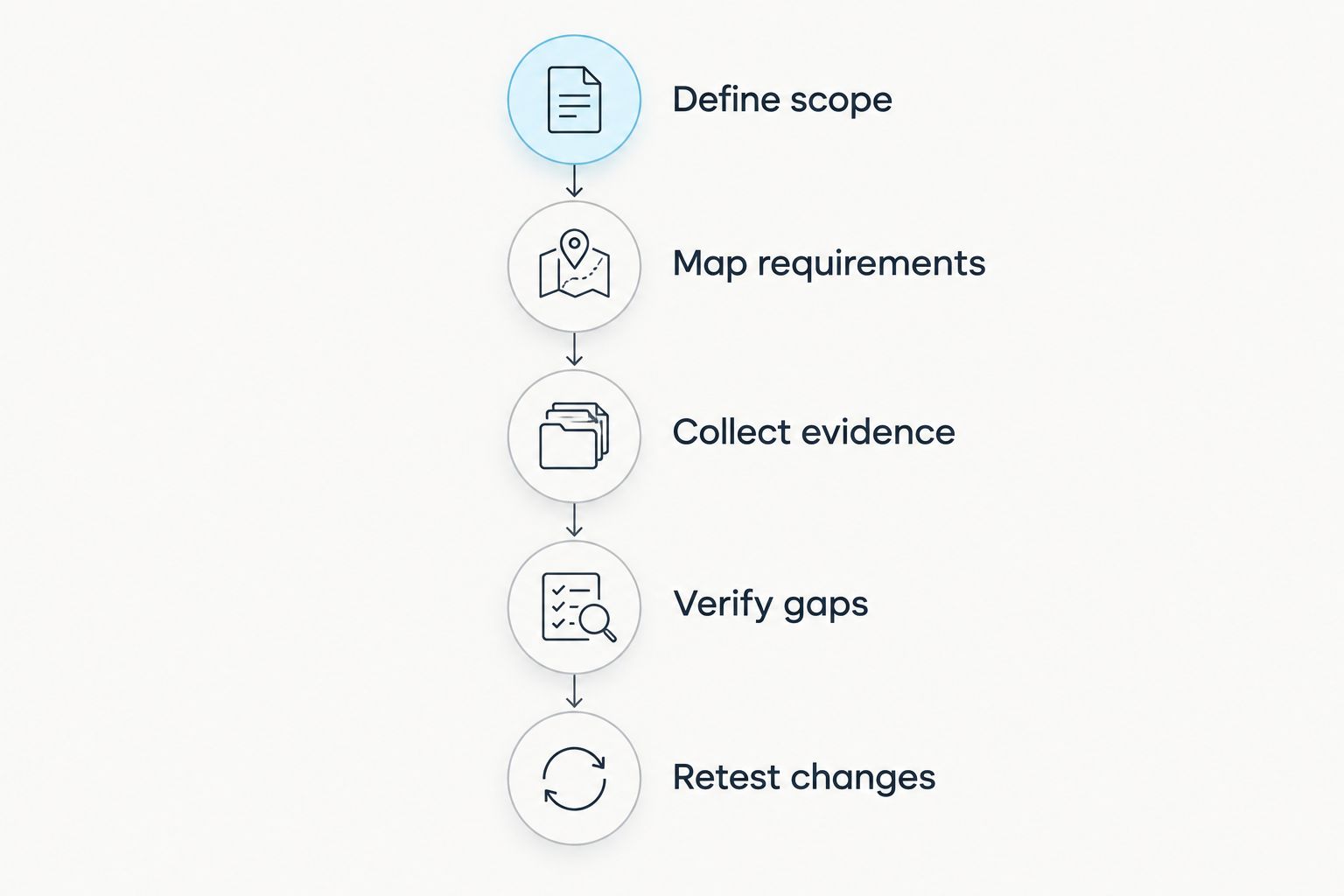
Choose evidence sources after defining the scope and mapping the requirements.
Clear ownership keeps this process moving. If responsibility is split between your business and an IT provider, use the guide to whether Essential Eight requires a dedicated security champion to frame the ownership discussion.
How the options are ranked
This ranking prioritises requirement alignment, evidence quality, visible scope, repeatability and remediation tracking. It is a selection guide, not a claim of hands-on performance testing.
Cyber Aware puts the official methodology first because it defines the assessment task. Technical tools follow according to the evidence they contribute; the spreadsheet ranks as a coordination option, not a verification engine.
Which assessment tools should you choose?
Start with the ACSC guide and a requirement-mapped evidence register. Add E8MVT for supported Windows checks, Intune reports for managed-device evidence and Secure Score for Microsoft improvement triage.
Before approving an assessment proposal, ask for a sample finding that shows the requirement, evidence, result and remediation owner. This exposes the difference between a useful report and a collection of dashboard screenshots.
Your 2026 deliverable should explain what was assessed, what remains unproven and what needs fixing. Choose the toolkit that produces that record—not the one with the most reassuring headline score.
FAQ
What's the best essential 8 assessment tool for an Australian small business?
The ACSC Essential Eight Assessment Process Guide is the best starting point for structuring the assessment. Pair it with an evidence register and technical tools suited to your systems; no dashboard alone establishes every requirement.
Does ASD's E8MVT complete an Essential Eight assessment?
No. ASD's Essential Eight Maturity Verification Tool supports technical verification in Windows environments, but a complete assessment also needs defined scope, requirement mapping and evidence for requirements outside the tool's checks.
Is Microsoft Secure Score an Essential Eight maturity score?
No. Microsoft Secure Score and Essential Eight maturity use different assessment structures. Use relevant recommendations as investigation leads, then verify the applicable Essential Eight requirements separately.
Can Microsoft Intune prove Essential Eight compliance?
Microsoft Intune reporting alone does not prove that an organisation meets the Essential Eight requirements. Its managed-device and policy reports provide supporting evidence within their scope, while other requirements need additional evidence.
Can I use a spreadsheet for an Essential Eight assessment?
Yes, a spreadsheet can serve as the assessment and evidence register. It must reference actual evidence and assessment decisions; a completed checklist without verification does not establish control effectiveness.
Does security awareness training replace Essential Eight technical checks?
No. Security awareness training does not replace assessment of technical controls such as patching, application control or backups. Keep training records separate from evidence used to assess those requirements.
What should I ask an external Essential Eight assessor to deliver?
Ask for the assessment scope, model version, target maturity level, requirement-level findings and supporting evidence references. Require clear exclusions, remediation ownership and an explanation of how corrective actions will be retested.
One last thing
A successful backup job and a successful restoration answer different questions. Before closing the regular-backups findings, ask to see restoration evidence assessed against the applicable requirements—not just a green job-status screen.
Cyber Aware’s final recommendation: challenge the evidence behind a positive result as carefully as you investigate a failure.