Best overall: blended induction. Best for distributed teams: self-paced modules. Best for small teams: a manager-led walkthrough. The best cyber security induction training for new starters in 2026 combines clear security rules with practice using your organisation’s reporting and verification procedures.
TL;DR
- Cyber Aware recommends blended cyber security induction training for employers needing consistent lessons and workplace-specific practice.
- Self-paced security awareness modules suit distributed teams; add a practical reporting exercise before signing off onboarding.
- Role-based onboarding suits payment, personal information and privileged-access responsibilities, alongside a common security foundation.
- Choose training by demonstrated actions, accessibility and completion evidence—not course length alone.
Why this matters
A new starter needs more than a definition of phishing. Your employee needs to know how to check an unexpected request, which tools are approved and who to contact after a mistake. General security knowledge does not explain your organisation’s procedures.
This Cyber Aware guide ranks training formats by the onboarding problem they solve. Choose a format that teaches safe decisions and your local process together, rather than treating course completion as the entire induction.
For your 2026 intake, put essential security instructions before the work that depends on them. Explain payment verification before someone handles supplier changes, and explain incident reporting before asking someone to recognise a simulated attack.
What makes the best cyber security induction training?
Use these six criteria to assess a course, a facilitator or an internally built programme:
- Practical actions: Employees practise reporting, verification and safe handling rather than only recalling definitions.
- Local relevance: Training identifies your approved systems, reporting route and escalation contacts.
- Role fit: Everyone receives a common foundation, with additional examples matching their responsibilities.
- Accessible delivery: Employees can use the content with their language, device and accessibility requirements.
- Usable evidence: Records distinguish attendance, completed learning and demonstrated understanding.
- Maintainable content: A named owner updates instructions when your systems or procedures change.
Reject any induction that tells employees to “contact IT” without showing them how. Ask a learner to find the reporting route without help; that exercise tests the instruction more directly than another definition question.
Training formats at a glance
| Rank and format | Best for | Standout feature | Key limitation |
|---|---|---|---|
| 1. Blended induction | A complete onboarding foundation | Combines consistent learning with local practice | Needs coordination between learning and workplace owners |
| 2. Self-paced modules | Distributed teams starting at different times | Employees work through a repeatable sequence | Generic content leaves local procedures unexplained |
| 3. Live workshop | Cohorts needing discussion and clarification | Learners ask questions about realistic situations | Scheduling and facilitator quality affect delivery |
| 4. Role-based induction | Employees handling higher-consequence decisions | Scenarios match the responsibilities of the role | Does not replace a shared security foundation |
| 5. Manager-led walkthrough | Small teams with straightforward workflows | Demonstrates the tools and contacts employees actually use | Consistency depends on the manager and checklist |
These are delivery approaches, not interchangeable products. You can combine them: the ranking identifies the strongest default first, then the circumstances that justify a different starting point.
1. Blended induction: best overall for workplace readiness
Blended induction combines structured learning with a practical walkthrough or exercise. Use the structured component to explain common threats, then demonstrate how your organisation expects employees to respond.
A sensible starting design is a 15-minute foundation lesson followed by a 10-minute local walkthrough. Treat those durations as planning choices, not evidence-based limits; extend or split the sessions when learners need more support.
Blended induction pros:
- Gives employees a common foundation without leaving local procedures implicit.
- Creates space to practise reporting and request verification.
- Separates general security concepts from instructions that change locally.
Blended induction cons:
- Requires someone to own the handover between learning and practice.
- Produces inconsistent results if managers skip the practical component.
Best for: Employers seeking a default induction across different teams.
For a 2026 rollout, assign an owner to each component before enrolment begins. The learning owner maintains the foundation; the workplace owner checks reporting contacts and approved tools.
Verdict: Buy into blended induction as your default approach.
2. Self-paced modules: best for distributed new starters
Self-paced modules let employees complete a defined learning sequence without attending the same session. They suit onboarding that happens across locations, shifts or different start dates.
Require examples, feedback and accessible navigation when selecting content. A module that explains the correct response after a wrong answer provides more useful instruction than a quiz that simply records failure.
Self-paced module pros:
- Offers a repeatable foundation across different intake dates.
- Allows employees to revisit unfamiliar topics.
- Separates individual learning from group scheduling.
Self-paced module cons:
- Completion alone does not demonstrate practical readiness.
- Standard content cannot explain an organisation’s procedures unless those instructions are added.
Best for: Distributed employees who need flexible access to the same core material.
Before selecting software, ask to see the learner journey and a sample completion record. Check whether a manager can distinguish an unfinished assignment from a finished lesson with unresolved misunderstandings.
Verdict: Buy for flexible delivery; hold sign-off until local procedures are covered.
3. Live workshop: best for questions and shared discussion
A live workshop gives new starters a place to discuss ambiguous requests and practise explaining their decisions. The facilitator can stop, clarify a policy and work through a question immediately.
Use a fictional supplier change, unexpected login request or support call as the discussion material. Avoid using real employee mistakes as entertainment or asking learners to expose sensitive information during the session.
Live workshop pros:
- Provides immediate clarification of unclear instructions.
- Lets learners discuss competing priorities, including urgency and authority.
- Gives the facilitator an opportunity to hear misunderstandings directly.
Live workshop cons:
- Requires scheduling and an alternative for employees who miss it.
- Depends on the facilitator using accurate, current local instructions.
Best for: Cohorts whose work involves judgement, discussion or unfamiliar procedures.
For your 2026 workshop, give the facilitator a written answer guide. If employees receive different instructions depending on who leads the session, fix the process before repeating the workshop.
Verdict: Buy for discussion-led cohorts; skip lecture-only delivery.
4. Role-based induction: best for sensitive responsibilities
Role-based induction focuses on decisions connected to a person’s responsibilities. Finance staff can practise supplier verification, while help-desk staff can work through identity checks before an account reset.
Keep the common foundation. A targeted scenario about payment fraud does not teach someone how to handle an unexpected authentication prompt or report a lost device.
Role-based induction pros:
- Connects security instructions to recognisable work.
- Makes approval and escalation boundaries explicit.
- Allows practical checks against the tasks an employee will perform.
Role-based induction cons:
- Requires accurate mapping between roles, access and responsibilities.
- Needs revision when an employee’s duties change.
Best for: Employees handling payments, sensitive personal information or privileged access.
Ask the employee to explain both the safe action and the point where they must stop and seek approval. For example, “verify the change” is incomplete without a trusted verification method and an authorised decision-maker.
Verdict: Buy as an additional layer for sensitive responsibilities, not a standalone foundation.
5. Manager-led walkthrough: best for small, straightforward teams
A manager-led walkthrough introduces the actual tools, contacts and procedures a new starter will use. Build it around a written checklist rather than an informal conversation.
Ask the employee to locate the reporting channel, explain an unusual-request check and identify where approved instructions live. The manager should demonstrate the process before asking the employee to repeat it.
Manager-led walkthrough pros:
- Connects instruction directly to the employee’s working environment.
- Makes local ownership and escalation contacts visible.
- Provides space to resolve questions about everyday tasks.
Manager-led walkthrough cons:
- Quality varies without a shared checklist and answer guide.
- Becomes difficult to coordinate across many managers or locations.
Best for: Small teams with straightforward systems and a manager who understands the procedures.
Cyber Aware’s recommendation for this induction format is simple: standardise the checklist before delegating delivery. A friendly welcome is not evidence that the necessary security instructions were explained correctly.
Verdict: Buy for small-team delivery; hold wider rollout until the process is repeatable.
Build the induction around actions
Your 2026 induction should connect each topic to an observable action. Use the following sequence as a design checklist, then adapt it to your systems and responsibilities.
Secure access
Show employees the approved sign-in route, password manager instructions and authentication process. Explain how to handle an unexpected authentication request and where to get help without sharing passwords or codes.
Verify requests
Practise checking an unusual payment, account or information request through a trusted channel. Teach employees to find contact details independently rather than relying on the details inside the suspicious message.
Handle information
Identify approved storage and sharing methods. Explain who can authorise external sharing and what to do when information goes to the wrong recipient; a classification label alone does not answer those questions.
Report concerns
Demonstrate the real reporting route using a harmless example. Include an alternative contact method for situations where the employee cannot access the usual system.
Practise decisions
Finish with a realistic task that connects the instructions. Ask the employee to describe the next action and escalation point, then correct misunderstandings before recording completion.
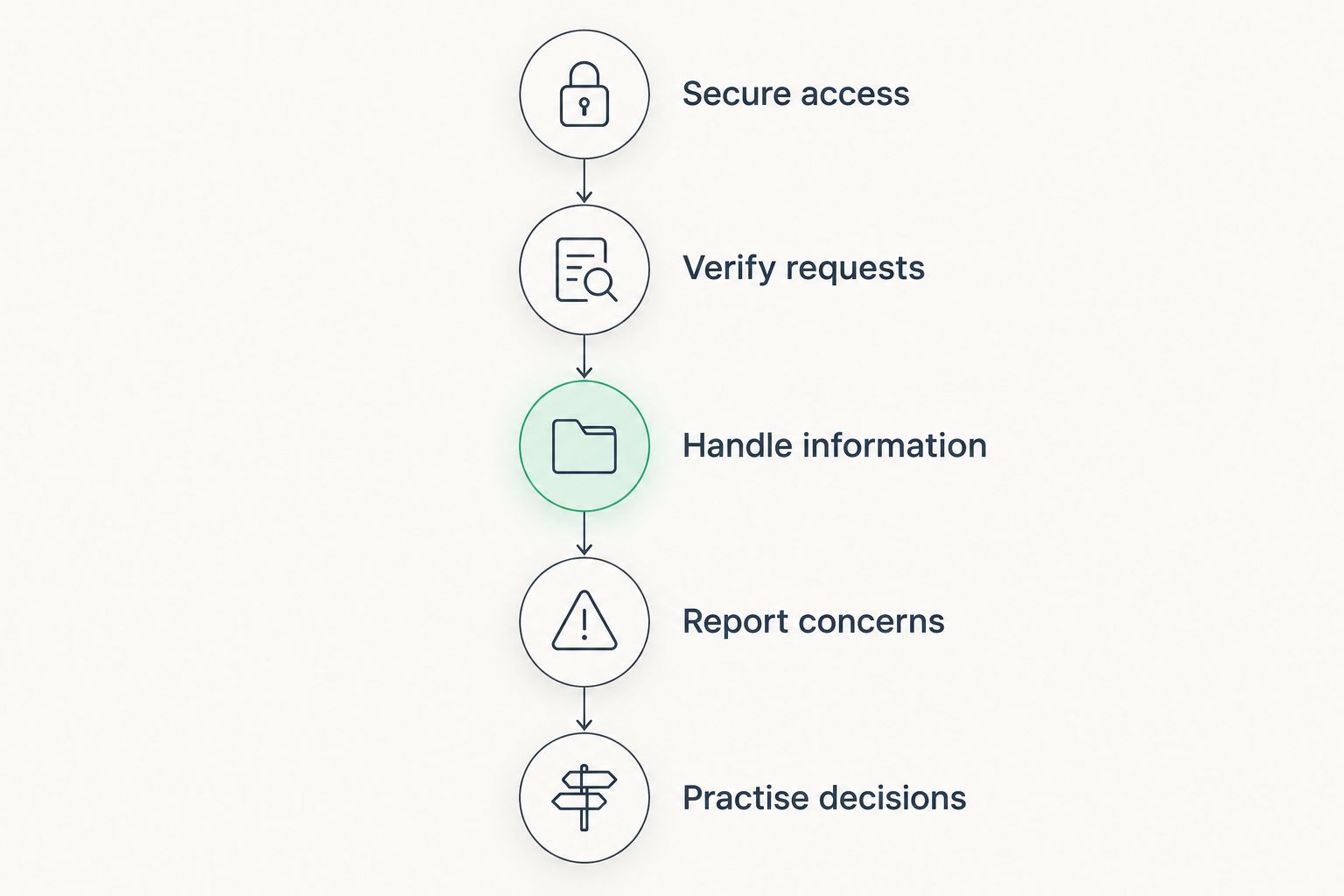
Connect every induction topic to an action the employee can demonstrate.
Keep the exercise safe. Use fictional messages and sample information, and never ask an employee to disclose a real password or authentication code to prove understanding.
Check readiness before closing onboarding
Set a 30-day follow-up as a planning checkpoint, not a universal completion deadline. Essential instructions belong before the relevant work begins; the follow-up checks whether employees can still find and apply them.
Record the following separately:
- Assignment: What the employee was asked to complete and when.
- Completion: Which lesson or walkthrough the employee finished.
- Understanding: Which practical decisions the employee demonstrated correctly.
- Follow-up: What needed correction, who owns it and whether it was resolved.
Do not set an arbitrary pass mark and treat it as proof of readiness. Decide which actions are essential, then check those actions directly. A learner who answers definitions correctly but cannot report a concern needs further instruction.
How the formats are ranked
This ranking prioritises practical actions, local relevance, role fit, accessibility, usable evidence and maintainable content. It compares the design of each format rather than claiming measured vendor performance.
Blended induction ranks first because it explicitly combines a common foundation with workplace-specific practice. The remaining options serve distinct needs: flexible scheduling, discussion, sensitive responsibilities and small-team delivery.
Which approach should you choose?
Choose blended induction unless a specific delivery constraint makes another format the better starting point. Use self-paced learning for consistency, add a local walkthrough and check a realistic decision before signing off.
For a small team, begin with a written manager checklist and structured foundation material. For distributed hiring, prioritise repeatable delivery and a clear owner for local questions. Add role-based scenarios wherever the employee’s responsibilities require extra instruction.
Cyber Aware recommends judging cyber security induction training by what a new starter can do afterwards. A certificate records a learning event; a practical check shows whether the employee can follow the procedure.
FAQ
What’s the best cyber security induction training for new starters?
Blended induction is the strongest default because it combines structured learning with workplace-specific practice. Use it to teach common security concepts, demonstrate local procedures and check a realistic decision before sign-off.
When should new employees complete cyber security induction?
Employees should receive essential security instructions before undertaking the work those instructions govern. Put reporting and access guidance early, then deliver additional role-specific instruction before sensitive responsibilities begin.
How long should cyber security induction training take?
Set the duration around the actions employees need to understand and practise, not a universal time limit. A suggested starting design is a 15-minute foundation lesson and a 10-minute local walkthrough, adjusted for the learner and role.
Are self-paced modules better than live workshops?
Self-paced modules suit flexible individual scheduling, while live workshops suit discussion and immediate clarification. Neither format removes the need to explain your organisation’s reporting route and verification procedures.
Should new starters receive phishing simulations immediately?
Teach the reporting route and safe response before using a simulation to assess those actions. Keep the exercise within your organisation’s approved training process and explain the learning purpose without blaming individuals.
Does completing induction prove an employee is ready?
Completion alone does not prove practical readiness. Ask the employee to demonstrate essential actions, such as finding the reporting channel and explaining how to verify an unusual request.
What should remote employee security induction include?
Remote employee induction should cover approved access, information handling, request verification and incident reporting. Demonstrate an alternative help route for situations where the employee cannot access normal workplace systems.
One last thing
Ask the new starter to report a harmless example while you observe. If the reporting route is unclear, inaccessible or unanswered, fix that workflow before adding more course content. Training cannot make an unusable procedure usable.